
Fancy Text Generator — 358+ Styles, Copy and Paste
Categories
Use jump buttons to explore premium style categories.
Generated Styles
Showing styles
Introduction
This fancy text generator lets you type your text above, pick a style, and copy it. That’s the whole process. No sign-up, no download, no watermark.
Most fancy text tools stop there. This one doesn’t. Keep scrolling and you’ll learn why some styles get your bio rejected, why others get cut off halfway through, and exactly which platforms allow what — the part almost nobody explains. Bookmark this page if you style text often; the character-limit and compatibility info here tends to come up again.
Quick answers, if you’re in a hurry: styled text works in bios and display names, not usernames. Strikethrough and underline styles eat more of your character limit than they look like they should — check the counter before you paste. Screen readers won’t read styled text reliably, so keep it out of anything important. None of this costs anything or needs an account. The rest of this page explains why, in plain language, with the exact numbers per platform.
What Is a Fancy Text Generator?
A fancy text generator doesn’t create new fonts. It swaps your regular letters for other characters that already exist inside the Unicode standard — the massive character system that every modern device and app uses to display text. You’ll see the same idea marketed under different names — font generator, font styler, font changer, font maker, font creator — but they’re all doing the same thing: turning your plain letters into different letter types, entirely online, with nothing to install. It’s also not a font editor: you’re never modifying an existing font file, just swapping in Unicode characters that already exist.
Unicode contains far more than the 26 letters on your keyboard. It also includes full alternate alphabets originally built for math and science notation: bold letters, italic letters, script letters, and more. In that sense, it’s really a letter types generator underneath the styling — one alphabet goes in, dozens of alternate letter types come out. A fancy text generator just maps “a” to its bold Unicode twin, “b” to its bold twin, and so on, until your whole sentence is rebuilt letter by letter.
That’s why you can copy and paste the result anywhere — Instagram, Discord, WhatsApp, a text message — without installing anything. You’re not applying a font. You’re typing in a different alphabet that happens to look styled.
Is this the same as a real font?
No. Real fonts are files your device downloads and installs, and they can display any character in any style the designer built — that’s how a graphic designer gets a genuinely custom font or a beautiful, hand-drawn pretty font for a logo. Unicode-styled text is different: a fixed set of characters that already exist everywhere, with no installation step and no design flexibility beyond what Unicode already offers. Each style is also locked to a specific case — some only look right typed in uppercase, others only in lowercase — because Unicode treats capital and lowercase letters as entirely separate characters, not one letter with a size switch.
Is this the same as Google Fonts?
No. Google Fonts is a library of tens of thousands of free, downloadable font files — real installable fonts, in the same category as the “real installable font” column below. This tool works entirely differently: it doesn’t install anything, it maps your text onto Unicode characters that already exist on your device.
| Unicode styled text | Real installable font | AI-generated text image | |
| What it actually is | Special Unicode characters | A font file (.ttf/.otf) | A picture of text |
| Needs installation | No | Yes | No |
| Works with copy-paste | Yes | No | No |
| Can be searched or edited as text | Yes, with some limits | Yes | No |
One quick note if you landed here wanting the third option: if you actually want text styled onto a photo or graphic — not copyable characters — an image editor like Picsart is built for that job, and is sometimes marketed as an AI text effects tool. This tool only outputs real, pasteable text.
How the Styling Actually Works
Fancy text works because the styled letters already exist inside Unicode, the character encoding technology every device shares — so your phone doesn’t need to download anything new to display them.
The specific characters used for bold, italic, script, and similar styles live in a Unicode block called Mathematical Alphanumeric Symbols, which spans code points U+1D400 through U+1D7FF. It was added to the Unicode standard in 2001, originally so mathematicians could write things like a bold vector or an italic variable without confusing it with plain text. Each letter in that block has its own unique code point — a numeric address that tells your device exactly which character to draw. The capital letter A in Mathematical Bold, for example, sits at code point U+1D400, a completely different character from the plain capital A you just typed, even though they look almost the same.
Other styles work differently. Strikethrough, underline, and overline text don’t come from a separate alphabet at all. They use combining characters — small marks that attach to the letter right before them. Strikethrough specifically uses the character named COMBINING LONG STROKE OVERLAY, at code point U+0336; underline uses COMBINING LOW LINE (U+0332). That difference is small to read about and big to feel once you hit a character limit.
Why Some Styles Use More Characters Than You Typed
A bold or italic letter is a straight one-for-one swap: one input letter becomes one output character. But a combining-mark style, like strikethrough, adds an invisible extra character after every single letter. Type six letters and ask for strikethrough, and you’re not sending six characters — you’re sending twelve.
| Style type | Example | Letters you typed | Characters actually stored |
| Bold (styled-letter) | Fancy | 5 | 5 |
| Strikethrough (combining-mark) | S̶t̶r̶i̶k̶e̶ | 6 | 12 |
This is the exact reason a bio that fits perfectly in plain text can get cut off the moment you paste a strikethrough or underline version of it. Nobody tells you this until it happens. We’re telling you now.
Here’s what that looks like in practice. Say your Discord nickname is “Alex” — four letters, four characters, nowhere near the 32-character limit. Switch to a strikethrough style and those same four letters become eight stored characters before you’ve typed anything else. Add a last name or a small symbol on top of that, and you can quietly blow past the limit without the text looking any longer on your screen.
Can a style eat into your character limit even without combining marks? Yes — even bold and italic text, with no combining marks involved at all, can quietly use two stored characters per letter on some platforms. Here’s why: the bold, italic, and script letters used in this generator live outside the most common block of Unicode, called the Basic Multilingual Plane. Characters outside that block are stored as two code units instead of one on many systems, even when the character itself isn’t combined with anything. A platform that counts characters this way (some do, some don’t) can see a five-letter bold word as ten characters, not five — with no strikethrough or underline involved at all. It’s a genuinely easy detail to miss, and it’s part of why the same bio can behave differently on different platforms even when you didn’t change the style.
If you only remember one rule from this section: pick styled-letter fonts like bold or italic anywhere the character limit is tight, and save combining-mark styles like strikethrough or underline for places with room to spare, like a caption or a document.
How to Use This Tool
Using this generator takes five quick steps: type, browse, favorite, compare, and copy.
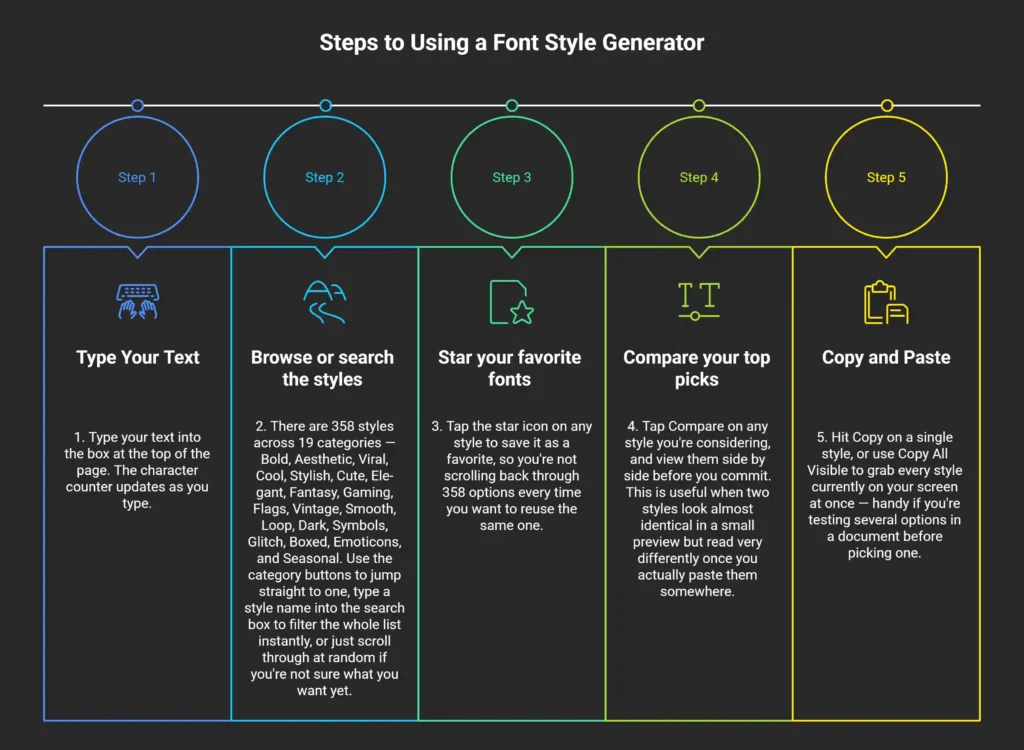
Once you’ve got the basics down, the next question is usually which of the 358 styles actually fits what you’re making — that’s what the category breakdown below is for.
Every Style Category, at a Glance
The 358 styles fall into four practical groups: classic and formal, playful and themed, edgy and internet-native, and identity-focused. Here’s how they break down and what each is actually good for:
| Group | Categories | Best for |
| Classic and formal | Bold, Elegant, Vintage, Smooth | Professional bios, resumes, formal messages |
| Playful and themed | Cute, Fantasy, Seasonal, Emoticons | Personal profiles, greetings, holiday posts |
| Edgy and internet-native | Glitch, Dark, Cool, Viral, Loop | Gaming tags, meme captions, aesthetic pages |
| Identity and community | Gaming, Flags, Symbols, Boxed, Stylish | Usernames, nicknames, national pride |
The Elegant and Vintage groups are where most of the cursive letters and calligraphy-style scripts live — the usual pick for fancy writing in a signature line or a formal bio. The Stylish category also works as a small text generator, since its superscript and subscript styles shrink your letters down for a tiny, minimalist look. And the Symbols category doubles as a standalone symbol text creator: arrows, stars, brackets, and math symbols — plain Unicode symbols and text symbols you can copy and paste on their own, with no letters attached.
The Glitch and Dark categories are what most people mean when they search for freaky or crazy font styles — the more unsettling, glitched-out end of the catalog.
If you’re picking a stylish name for a gaming profile or a social handle, Gaming and Stylish are the two groups built for exactly that — which is what most people actually mean when they search for a name font generator or a name font style. And if you just want something playful rather than polished, Cute and Emoticons work as a funny font generator option too.
The Flags category alone covers 114 countries, from Brazil and Nigeria to India, Indonesia, the Philippines, and Pakistan — genuinely global coverage, not a handful of the usual suspects. The Seasonal category rotates with the calendar: Christmas, Halloween, and Valentine’s styles show up when they’re relevant instead of sitting there year-round as dead weight. Taken together, the full set works less like a single style list and more like a font library and text converter — broad enough to cover most of what people normally open a separate Unicode text generator or Unicode fonts reference to find.
Picking a style is only half the job, though. The other half is knowing whether it’ll actually work where you’re about to paste it — which is where most of the real frustration in this whole topic comes from.
Where Fancy Text Actually Works — and Where It Doesn’t
Styles from this fancy text generator work in bios, captions, and display names on every major platform, but they’re blocked in usernames and handles almost everywhere. That single rule explains most of the rejected names and confused “why won’t this work” moments people run into.
The most important distinction: your username and your bio are not the same field, and platforms treat them very differently. Usernames and handles are usually locked down to plain letters, numbers, and a couple of basic symbols. Bios, captions, and display names are usually wide open.
| Platform | Bio / caption | Username / handle | Display name / nickname | Typical limit |
| Works | Blocked | — | Bio: 150 characters | |
| TikTok | Works | Blocked | Works | Bio: 80 characters |
| Twitter/X | Works | Blocked | Works | Bio: 160 characters |
| Discord | Works | Blocked | Works | Nickname: 32 characters |
| Works | Blocked (vanity URL is alphanumeric-only) | Works | Varies by field | |
| Works | No separate public username field | Works | About: ~139 characters | |
| Telegram | Works | Blocked | Works | Bio: 70 characters |
| Works, but read the note below | Blocked | — | Headline: 220 characters |
A note on LinkedIn specifically: styled text technically displays fine there, but LinkedIn’s audience skews professional, and heavily decorated text can come across as less credible in that context. If you use it at all on LinkedIn, a light touch — bold for one word in a headline, for instance — works better than an entire styled paragraph.
Gaming Platforms and In-Game Names
Gaming names follow different rules than social bios, and support is less consistent from game to game.
| Game or platform | Unicode support in names | Note |
| Roblox | Partial | Some symbols get filtered automatically |
| Minecraft (Java Edition) | Partial | Depends on the server you’re joining |
| PUBG Mobile | Partial | Support varies by region |
| Free Fire | Partial | Support varies by region |
| Mobile Legends: Bang Bang | Partial | Popular use case across Southeast Asia |
| BGMI | Partial | India-specific naming rules apply |
| Call of Duty Mobile | Limited | Stricter filtering than most |
| VRChat | Full | Applies to display name only |
Gaming platform behavior above is based on general observation and community reporting rather than each publisher’s official documentation. Filtering rules also vary by region and app version, so treat this table as a general guide rather than a guarantee.
If a game rejects your styled name outright, that’s the platform’s filter, not a problem with the text itself. Try a simpler styled-letter font (bold or italic) before giving up — those are far more widely accepted than symbol-heavy or combining-mark styles.
Why Text Sometimes Looks Broken
Four problems cause almost everything that goes wrong, and each one has a specific, fixable cause.
Text shows up as boxes or question marks. The device or app you’re viewing it on doesn’t have the specific Unicode block that style relies on. This is more common on older phones and some budget Android devices, though the exact cutoff depends on the operating system version and which font the manufacturer shipped with it. Styled-letter fonts (bold, italic) are generally more reliable across devices than decorative symbol styles, because they’ve been part of Unicode for over two decades and are broadly supported.
Your username or nickname got rejected. You’re almost certainly trying to use styled text in a username field rather than a bio or display name field. Check the compatibility table above — this is the single most common cause of a rejected name.
Your bio got cut off partway through. If you used a strikethrough, underline, or overline style, you likely hit the combining-character problem explained earlier. The fix is simple: check the character counter before you paste, and remember that combining-mark styles roughly double your real character count.
It looks right on your phone but wrong on a friend’s. This is normal, not a bug. Font rendering support genuinely differs by operating system, OS version, and even which app you’re viewing it in. There’s no universal fix beyond sticking to the most widely supported style categories if consistency matters more than decoration.
Fixed your issue? Jump back to the generator ↑ and try a different style.
Is Fancy Text Accessible?
Not reliably, and that’s true of any fancy text tool, not just this one. Screen readers are built to read plain text aloud clearly, and Unicode-styled text can interfere with that.
Depending on the screen reader and the specific style, bold or italic Unicode letters may be read out as individual symbol names, skipped entirely, or garbled — because technically, they aren’t the letters “a” through “z” anymore; they’re different characters that only look like them.
The Unicode Consortium, which maintains the standard these characters come from, has noted that the Mathematical Alphanumeric Symbols block was designed for mathematical notation, not as a substitute for regular text formatting. The W3C’s Web Content Accessibility Guidelines (WCAG) similarly address using visual styling as the only way to convey meaning or structure, rather than relying on text that assistive technology can parse correctly.
In practical terms: use decorative styles for things people are meant to see, glance at, and enjoy — like a display name or a one-line bio. Avoid them for anything a screen reader user genuinely needs to understand, like instructions, contact information, or the substance of a message.
Is It Safe to Use?
Yes, using a fancy text generator is safe, with a few practical caveats worth knowing before you paste styled text everywhere.
Does this tool store what I type?
No. Your text is converted in your browser and never saved on our end.
Can fancy text get flagged as spam?
Heavily styled or symbol-stuffed text can occasionally trigger spam filters on some platforms, particularly in comments. Using one clean style for a bio or name is very unlikely to cause any issue; stacking multiple decorative symbols into every sentence of a public comment is more likely to get flagged.
Can I use generated text commercially?
Generally yes. These characters come from the Unicode standard itself, which is not the same as a licensed font design, so there’s typically no font-licensing restriction on using them in a business name, product listing, or ad. This isn’t legal advice; if commercial use matters for your specific situation, check the terms of the platform you’re publishing on.
Does Fancy Text Affect Search Visibility?
Yes, it can. Search engines and most in-app search features match plain text far more reliably than styled Unicode text.
If your entire Instagram bio or TikTok caption is written in a decorative style, it may not show up when someone searches your name or your keywords in plain text — because to a search algorithm, styled “M” and plain “M” aren’t the same character at all.
Here’s the simple rule that solves this: style what people are meant to notice visually — a name, a short tagline, a single emphasized word — and keep anything you actually want found through search (your real name, your niche, your keywords) in plain text somewhere on the same profile.
When to Use Fancy Text (and When Not To)
Use it where people are meant to look; skip it where accuracy or discovery matters more than decoration.
| Situation | Use fancy text? | Why |
| Display name or nickname | Yes | Purely visual, no functional downside |
| Bio or short caption | Yes | Wide platform support, low character risk |
| Username or handle | No | Blocked on almost every major platform |
| Content for screen reader users | No | May be read incorrectly or skipped |
| Long text you want search to find | No | Search doesn’t match styled and plain characters as the same |
| Formal or professional posts (e.g. LinkedIn body text) | Sparingly | Can read as less credible in that context |
How This Compares to Other Generators
This tool offers more styles, more ways to find the right one, and more platform-specific guidance than most fancy text, cool font, or stylish fonts generators — including LingoJam.
| Feature | This tool | Typical generator |
| Number of styles | 358 | Usually 50–300 |
| Live style search | Yes | Rare |
| Side-by-side style comparison | Yes | Not offered |
| Bulk “copy all visible” | Yes | Not offered |
| Platform character-limit guidance | Yes | Rare, and usually incomplete |
| Accessibility guidance | Yes | Rare |
| Country flag styles | 114 | Rare or none |
How does this compare to LingoJam specifically?
LingoJam is one of the original, well-known fancy text tools and covers the same basic Unicode-substitution idea. The main differences here are scale (358 styles versus a smaller catalog), the search and compare functions for narrowing down options quickly, and the platform-specific character-limit and accessibility information included directly on this page.
Ready-to-Use Templates
Here are five starting points, already checked against the platform limits above:
- Instagram bio line: a single bold or script style for your name, kept under 150 characters total with your plain-text bio.
- Discord nickname: a short bold or cool-style name kept under 32 characters — this is the tightest limit of any major platform, so simpler is safer here.
- Gaming name: stick to bold or italic styles first; they’re accepted by the widest range of games, including Free Fire, PUBG Mobile, and Mobile Legends.
- YouTube video title: one styled word for emphasis, with the rest in plain text so search still picks it up.
- WhatsApp status: any style works well here, since WhatsApp’s About field is short (around 139 characters) and rarely filters Unicode.
Found a combination you like? Jump back to the generator ↑ to build it, or share this page with anyone who keeps asking how you styled your bio.
Frequently Asked Questions
What is a fancy text generator?
A tool that converts normal letters into Unicode characters that look like different fonts and text styles — bold, italic, script, and more — without needing any font installed. It’s a character swap, not a real typeface.
Is it free to use?
Yes, this fancy text generator is fully free, with no account required and no limit on how many times you can generate or copy text.
Can I use fancy text in my Instagram or TikTok username?
No. Instagram and TikTok usernames only accept plain letters, numbers, periods, and underscores. Bios and display names on both platforms accept Unicode-styled text without issue.
Why did my bio get cut off after I pasted styled text?
Some styles — strikethrough, underline, and overline in particular — add an invisible character to every letter, which roughly doubles your real character count. Check the counter on this page before pasting into a field with a strict limit.
Will fancy text work on all my devices?
Mostly, but not perfectly. Styled-letter fonts like bold and italic are very widely supported. More decorative or symbol-heavy styles can show up as boxes or question marks on older phones or certain apps that don’t support that specific Unicode block.
Is fancy text accessible to screen readers?
Not reliably. Screen readers are built for plain text, and styled Unicode characters may be read incorrectly, skipped, or garbled. Use fancy text for visual elements like a name or short tagline, not for content someone needs to understand through a screen reader.
Does this tool store what I type?
No. Text is converted directly in your web browser and isn’t saved or sent anywhere.
Can fancy text hurt my SEO or get flagged as spam?
Styled text isn’t matched by search algorithms the way plain text is, so an entirely styled bio or caption may not show up in searches for those words. It’s very unlikely to trigger spam flags on its own unless it’s combined with excessive symbols in public comments.
How do I convert fancy text back to normal text?
There isn’t a reliable way to reverse it automatically, since the styled characters are different Unicode characters, not formatting applied on top of your original text. Retype your text normally instead.
What’s the difference between a font, a typeface, and Unicode text?
A typeface is the overall design of a set of letters (like Helvetica). A font is the actual file your device installs to display that typeface. Unicode-styled text isn’t either of those — it’s a fixed set of existing characters that happen to look styled, with no installation and no design flexibility beyond what already exists in the standard.
How does this compare to LingoJam?
Both convert text using Unicode substitution. This tool has a larger style catalog (358 versus a smaller set), a live search and compare feature for narrowing down choices, and platform-specific character-limit and accessibility details built directly into the page.
Can I generate colored fancy text, like blue text?
Not through Unicode alone. Unicode characters don’t carry color — color comes from whatever app or platform renders the text, not from the character itself. That’s why you won’t find a “blue text” or color option in this generator: some platforms let you change text color separately (a colored username on Discord, for example), but that’s a platform feature, not something any Unicode-based tool can control.
Can I compare two styles before choosing one?
Yes. Tap Compare on any style card to view it alongside others before copying, so you can check how it actually reads rather than judging from a small preview alone.
Style Your Text
That’s everything you need to get the most out of this fancy text generator — how the styles work, where they’ll actually paste correctly, and what to avoid. Jump back to the generator ↑ and try a few styles on your own text.
Some people search for a font typer, others for an awesome fonts generator, others just want fancy fonts that work — different names, same tool. Some spell it favourite, others favorite; the star icon works the same either way.
If this saved you a rejected bio or a cut-off nickname, bookmark the page for next time, or share it with whoever asks how you did that to your name. Platform rules shift occasionally, so we’ll keep this updated — check back if something here stops matching what you see on your app. One last honest note: the numbers and rules above reflect how these platforms currently behave, not guesses. They’re not permanent — platforms change limits and filtering rules without warning — which is exactly why this page focuses on explaining the why behind each rule, not just the number itself. Understand the mechanism, and you’ll be able to figure out a new platform’s quirks even before we’ve had a chance to update this page for it.
Related Tools
Bold Font Generator — for when you want punchy, high-contrast text that’s more widely device-compatible than heavily decorated fancy styles.
Aesthetic Font Generator — for soft, moody, cursive-leaning styles built specifically around mood-board and lifestyle content.
Cute Font Generator — for kawaii, playful styles with hearts and kaomoji, better suited to casual bios than the broader fancy text catalog.
Instagram Font Generator — for styles organized specifically by Instagram use case (bio, Reels, Stories) rather than by typography alone.
TikTok Bio Generator — for ready-made, TikTok-specific bio formatting that respects the platform’s 80-character limit.
Social Media Bio Generator — for pre-written bios across Instagram, TikTok, X, and Facebook, with the correct character limit built in for each.