
TikTok Bio Generator
Bio Categories
Jump to a category or search for a style.
Generated TikTok Bios
Showing styles
TikTok Bio Preview
Click Preview on any style to see it here.
@yourusername
Digital Creator
Choose a style and click Preview.
Independent visual preview. Not affiliated with TikTok.
Introduction
Type your bio once. See it in 100 ready-made styles instantly — free, with no signup.
Your TikTok bio has 80 characters to do a lot of work. It has to say who you are, what you post, and why someone should tap follow, all before a viewer swipes back to their feed. This TikTok bio generator doesn’t try to write that message for you. You write it, in your own words, and the generator shows you 100 different ways to format and style it, organized into 10 categories, so you can find the look that fits your account without guessing.
Type your text into the box above. Browse by category or search for a specific style. Preview any option on a real profile mockup, compare a few side by side, and copy the one you like straight into TikTok.
What Is a TikTok Bio, and What Does This Tool Actually Do?
A TikTok bio is the short line of text under your username on your profile. It’s usually the second thing a new visitor reads, right after your username and profile photo, and often the deciding factor in whether they follow you or scroll on. TikTok caps it at 80 characters, which is short enough that almost every word has to earn its place.
Most tools that call themselves an AI TikTok bio generator use AI to write new sentences based on a description you type in. That’s not how this one works, and it’s worth being clear about the difference. Here, the words are always yours. You type your actual bio text into the input field, and the tool applies formatting, symbols, spacing, and typographic style around it. Think of it less like a ghostwriter and more like trying on 100 outfits for the same sentence.
This matters for a specific reason. AI-written bios tend to sound similar to each other, because they’re pulling from the same patterns. A tool that keeps your own words intact avoids that problem completely. Your bio still sounds like you. It just looks more finished.
TikTok Bio Character Limit and Rules
Getting the technical details right matters more than most creators realize, because a bio that gets cut off or rejected wastes the one shot you had to make a first impression.
| Field | Limit | Notes |
| Bio | 80 characters | Includes spaces, emoji, and line breaks |
| Emoji | Varies | Many emoji count as more than one character toward your 80-character total |
| Line breaks | Counts as 1 character each | Up to a few visible lines before mobile screens start truncating |
| Hashtags in bio | Not clickable | TikTok doesn’t treat bio hashtags as searchable links the way Instagram does |
| Website link | Business accounts: usually available right away. Personal accounts: typically requires reaching a follower threshold TikTok sets | Requirements have shifted over time, so check your own account’s Edit Profile screen for your current options |
A few notes worth expanding on:
Emoji cost more than they look like they cost. A single emoji can eat two characters instead of one, depending on the character. If your bio feels like it’s running out of room faster than you expected, emoji are almost always the reason. Type your draft into a live counter, TikTok’s own edit screen or the input field above, before you commit to it.
Hashtags don’t function as links inside a bio. They can still signal your niche to a human reader, and to TikTok’s own search and recommendation system, but don’t expect them to be tappable the way they are in a caption.
Link eligibility depends on account type, not just follower count. If you’ve switched to a business account, you likely have access to the clickable “Website” field regardless of your audience size. Personal accounts have historically needed to cross a follower threshold before that field appears. Since TikTok adjusts these rules periodically, the most reliable check is your own profile settings, not a number you read somewhere else.
You may come across TikTok videos claiming the bio limit was recently raised to 120, 160, or even 180 characters. As of this writing, none of that is confirmed by TikTok itself or by independent testing, and 80 characters remains the figure that consistently holds up. Plan for 80. If your own account shows more room when you go to edit it, treat that as a bonus, not something to build a strategy around.
How to Write a TikTok Bio, Step by Step
Where to Find the Bio Field on TikTok
If you’ve searched how to make a bio on TikTok or how to get bio on TikTok and just want the mechanical answer, the field is already built into every profile. Open the app, tap your profile icon, tap Edit Profile, and you’ll see a bio box waiting under your display name. Type into that box and tap save — that’s the whole process, whether you’re asking how to create a TikTok bio for a brand-new account or how to make bio in TikTok after months of leaving it blank. Writing one that actually works is the part covered below.
A strong bio isn’t about clever wording. It’s about answering three questions fast: who are you, what do you post, and what should someone do next.
- Decide what job your bio needs to do. Are you introducing yourself, promoting a niche, or driving clicks to a link? Pick one priority. Trying to do all three usually means doing none of them well in 80 characters.
- Write your core message first, plain and unstyled. Something like “Home workouts for beginners, no gym needed” says more in fewer words than a vague line like “Fitness lover living my best life.”
- Add one call to action, if it fits. A short instruction, “New video every Tuesday,” “Link below,” “DM for collabs,” gives visitors a reason to act instead of just reading and leaving.
- Pick a style that matches your content, not just your mood. A comedy account and a small business account shouldn’t look the same, even if the underlying message is similarly short.
- Preview it before you publish. Text that reads fine in a plain box can look cramped or awkward once it’s sitting under a real profile photo and follower count. Check it on an actual mobile-sized preview first.
What Should You Put in Your TikTok Bio?
If you’ve searched what to put on my TikTok bio, what should I put on my TikTok bio, or simply what should my TikTok bio be, the honest answer is that it depends on what kind of account you’re running — what works as your bio on TikTok for a comedy creator isn’t what you’d add for a small business. Here’s what tends to work for each, with real formatted examples pulled from the style categories in this TikTok bio generator.
Personal and Lifestyle Accounts
If you’re not sure what to add in your TikTok bio here, personal bios do best when they lead with personality instead of a job title.
- clean girl era · type your text here
- Y2K ✦ type your text here
- quiet · type your text here
Creators and Influencers
Creator bios usually name a niche directly, since that’s what tells both viewers and TikTok’s discovery system what your content is about.
- Niche Expert — NICHE: Type your text here
- Daily Vlog — DAILY VLOG > Type your text here
- Content Lab — CONTENT LAB ◆ TYPE YOUR TEXT HERE
Small Businesses and Brands
Business bios work better as a routing sign than a slogan: what you sell, who it’s for, and what to do next.
- Brand Partner — PARTNER ◇ Type your text here
- Studio Line — STUDIO — Type your text here
- Example filled in: Handmade ceramics · ships worldwide · DM “shop”
TikTok Shop and E-Commerce Sellers
If you’re selling through TikTok Shop, your bio has one job above all others: make it obvious there’s something to buy. A niche description without a purchase signal wastes the space. Something like “Small-batch candles · shop the drop below” tells a browsing viewer exactly what to expect before they tap through. If you’re searching how to add Etsy link to TikTok bio specifically, the process is the same as any other link: paste your Etsy shop URL into the Website field under Edit Profile, not into the bio text itself, since plain text links in the bio aren’t clickable.
TikTok LIVE Streamers
LIVE-focused bios convert better when they set expectations about your schedule, not just your personality. A line like “LIVE Fridays 7pm · Q&A + behind the scenes” gives a casual profile visitor a concrete reason to come back at a specific time, which matters more for LIVE audiences than for regular video viewers.
100 TikTok Bio Ideas, Organized by Style
Every style in this TikTok bio generator keeps your own bio text and wraps it in a different visual format. Below is a sample from each of the 10 categories so you can see the range before you open the full tool.
| Category | Example style | What it looks like |
| Viral & Trending | FYP Signal | FYP ⚡ Type your text here |
| Creator & Influencer | UGC Ready | UGC ✓ Type your text here |
| Aesthetic Mood | Soft Launch | soft launch — type your text here |
| Bold & Statement | Big Energy | BIG ENERGY ⚡ Type your text here |
| Cute & Kawaii | Sweet Spark | ◇ Type your text here ◇ |
| Cool & Edgy | Dark Mode | ⟨ Type your text here ⟩ |
| Stylish & Luxury | Quiet Luxury | QUIET LUXURY • Type your text here |
| Funny & Attitude | Plot Twist | PLOT TWIST: Type your text here |
| Minimal & Clean | One Line Bio | — Type your text here — |
| TikTok Bio Frames | Viral Bracket | [ Type your text here ] |
Each category has 10 styles in total. If you know roughly what mood you’re going for, jump straight to that category in the bio generator above. If you’re not sure, generating a few options across categories and comparing them side by side is usually faster than trying to decide in the abstract.
TikTok Bio vs. Instagram Bio vs. X (Twitter) Bio
If you’re managing more than one platform, it helps to know how the rules actually differ instead of assuming one bio fits everywhere.
| TikTok | X (Twitter) | ||
| Character limit | 80 | 150 | 160 |
| Clickable link in bio text | No, separate Website field | Yes, one link | Yes, one link |
| Hashtags clickable | No | Yes | Yes |
| Line breaks allowed | Yes, counted in limit | Yes | Yes |
The safest approach if you’re posting the same identity across platforms: write the TikTok version first, since it’s the shortest. A bio that works at 80 characters will almost always still work if you have more room on Instagram or X. Going the other direction usually means cutting something important.
Common TikTok Bio Mistakes
Being too vague. “Living my best life” or “Just here for fun” tells a viewer nothing about what to expect from your content. Specifics, a niche, a format, a schedule, do far more work than a mood.
Ignoring the character limit until the last second. Writing a bio that’s 15 characters over and then hacking it down usually produces something choppier than starting within the limit from the beginning.
Skipping the call to action. A bio that describes you but never tells a visitor what to do next leaves engagement on the table. Even one short instruction changes that.
Copying someone else’s bio word for word. It’s tempting, especially when scrolling through bio idea lists, but a bio that’s identical to a bigger creator’s doesn’t help TikTok’s system understand who you specifically are, and it reads as generic to anyone who’s seen the original.
Never updating it. A bio that made sense a year ago may not reflect your current content, offer, or schedule. Treat it as something to revisit, not something you set once and forget.
Here’s what that looks like in practice:
| Weak bio | Stronger version | Why it works better |
| “Love making videos, hope you enjoy!” | “Budget travel tips for under $50/day · new spot every week” | Names the niche and sets a posting expectation |
| “Just a girl having fun on here” | “Thrifted fashion finds · outfit breakdowns daily” | Replaces mood with content type |
| “Check out my stuff” | “Handmade jewelry · ships in 2 days · shop below” | Turns a vague CTA into a specific one |
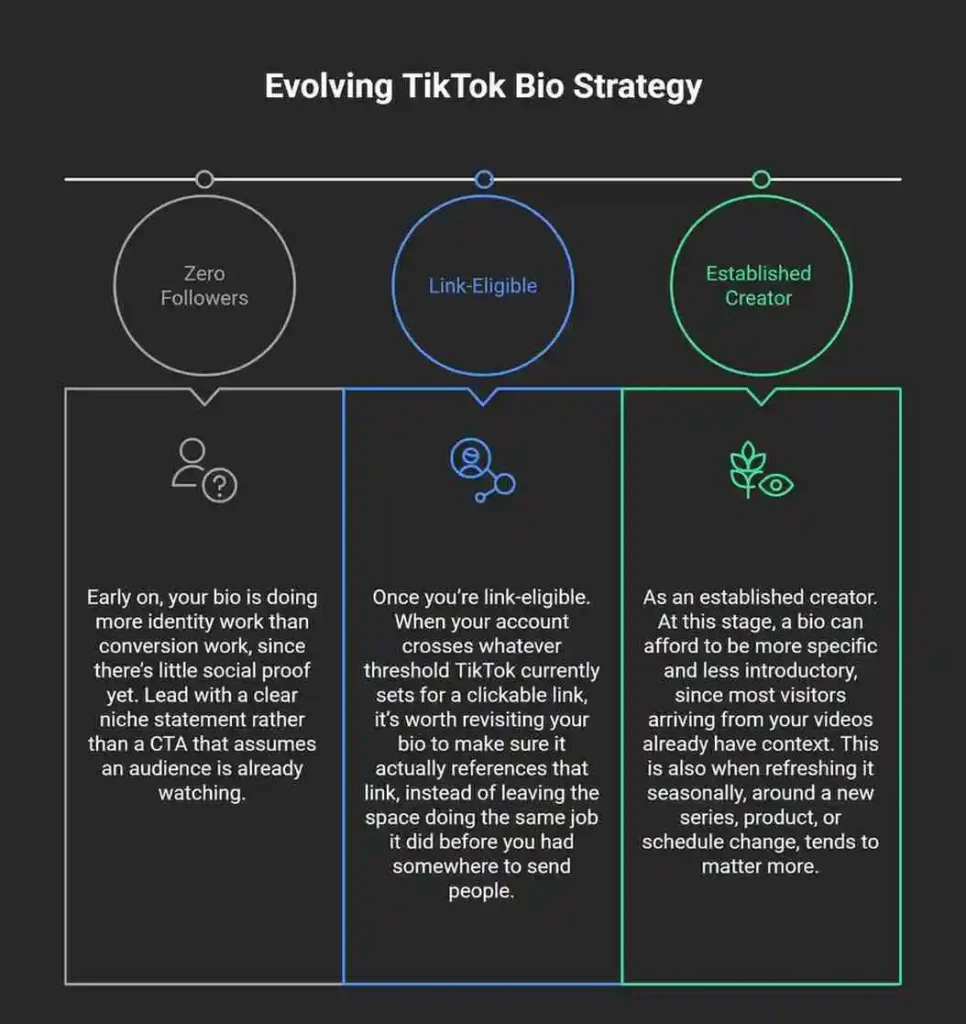
Writing Your Bio at Different Stages
TikTok Bio Troubleshooting
Why isn’t my bio link working? Double-check that you’re editing the dedicated Website field, not just typing a URL into the bio text box, since plain text links in the bio aren’t clickable. If the field is missing entirely, it likely means your account type or follower count doesn’t currently meet TikTok’s requirement for it.
Why isn’t my updated bio showing to other people? Profile changes can take time to propagate, particularly on TikTok LIVE or across different devices. If it’s been more than a day and nothing’s changed, it’s worth checking for an app update or trying from a different device before assuming something’s wrong with your account.
Why does my bio keep reverting to an old version? This is usually a caching issue rather than a real rollback. Closing and reopening the app, or checking whether you have multiple devices logged into the same account with unsynced edits, resolves most cases.
Why can’t I see other people’s bio links? Not every account has one to show. If a creator hasn’t switched to a business or creator account, or hasn’t met the follower requirement, there’s simply no link field on their profile for you to see.
Frequently Asked Questions
Is this a free TikTok bio generator?
Yes. There’s no signup, login, cost, or limit on how many styles you can preview or copy.
Does this TikTok bio generator use AI to write my bio for me?
No. You write your own bio text. The tool applies formatting and style around the words you provide, so the message stays yours.
Are the bio styles unique, or are they copied from somewhere else?
The 100 styles are built and organized specifically for this TikTok bio maker, grouped into 10 categories so you can browse by mood or use case rather than scrolling through an unsorted list.
Can I use the same generated bio on Instagram or X?
You can, since anything under 80 characters fits comfortably within Instagram’s and X’s longer limits. Just be aware some symbols or spacing may render slightly differently on other platforms.
Does my bio affect how TikTok’s algorithm shows my content?
Your bio contributes to how TikTok’s system understands your account’s niche, alongside your captions and video content, but it isn’t the main driver of reach. Its bigger job is converting a profile visit into a follow, not boosting distribution directly.
Can keywords in my bio help people find me through TikTok search?
Including a plain-language niche keyword, like “fitness coach” or “budget travel,” in your bio can help you show up when someone searches that term directly on TikTok, since the platform increasingly functions as a search tool for its users.
Does this work for business accounts?
Yes. Several of the categories, including Creator & Influencer and Stylish & Luxury, are built with business and brand use in mind, not just personal profiles.
How often should I update my bio?
There’s no fixed schedule, but revisiting it whenever your niche, offer, or posting routine changes keeps it accurate. A quarterly check is a reasonable habit even without a specific reason to change it.
About This Tool
This TikTok bio generator was built around a simple observation from looking at hundreds of TikTok profiles: the bios that stood out weren’t the ones with the cleverest writing. They were the ones with clear formatting that made a simple message easy to read at a glance. That’s the gap this tool fills. It doesn’t try to write your identity for you. It gives you 100 tested ways to present it.
Character limit and formatting details on this page reflect TikTok’s publicly documented profile fields as of 2026. Platform rules do change, so when in doubt, verify against your own account’s Edit Profile screen.
## Related Tools
- Fancy Text Generator — for a much larger catalog of 358 styles beyond bio-specific formatting.
- Bold Font Generator — for punchy, high-contrast styles suited to gaming and confident bios.
- Aesthetic Font Generator — for soft, moodboard-style fonts suited to lifestyle content.
- Cute Font Generator — for kawaii, playful styles with hearts and kaomoji.
- Instagram Font Generator — for styles organized specifically by Instagram use case.
- Social Media Bio Generator — for pre-written bios across Instagram, TikTok, X, and Facebook.