Bold Font Generator
Categories
Use jump buttons to explore bold font categories.
Generated Bold Fonts
Showing bold fonts
Introduction
Create bold text fonts for Instagram, TikTok, WhatsApp, Discord, usernames, bios, captions, gaming names, and social media posts instantly with this free bold font generator.
It gives you 120 bold styles across 12 categories, generated instantly. Copy one style, or copy them all at once. No sign-up, no download, no cost.
What Is a Bold Font Generator?
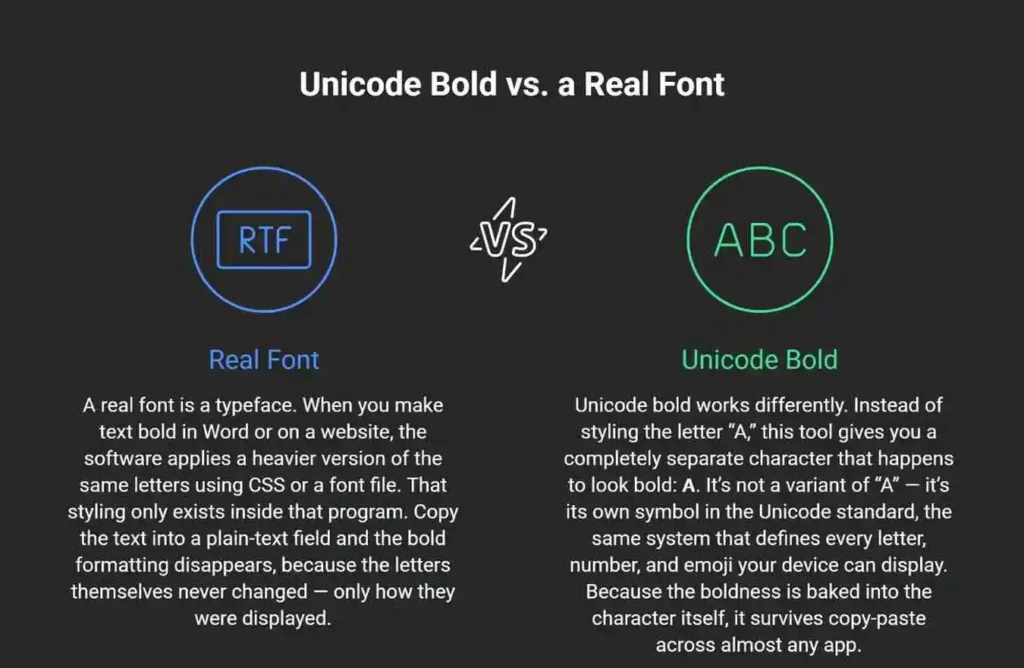
A bold font generator doesn’t actually make your text bold. It swaps each letter for a different character that already looks bold, using a set of symbols built into the Unicode standard. That’s why the result works when you paste it into Instagram, WhatsApp, or Discord — apps that don’t support real text formatting.
You might see this same kind of tool called a font changer, a text generator, a fancy text generator, or a bold text converter. They’re different names for the same idea, and it’s worth telling them apart from a text editor, which is a different thing entirely — a text editor like Word or Google Docs applies real formatting to normal letters, while this tool hands you entirely different characters that already look bold. Whatever name you searched under, the output here is the same: instant bold fonts you can copy and paste into almost any app.
This matters because it explains both what the tool can do and where it runs into limits. Once you understand the mechanism, the rest of this page — compatibility, search behavior, accessibility — makes a lot more sense.
Where This Technology Comes From
Unicode organizes its characters into blocks, and the characters this tool generates come from the one called Mathematical Alphanumeric Symbols. It was originally created for math and science notation — things like bold variables in equations — not for social media. People discovered these characters look like a bold alphabet and started using them to style text on platforms that don’t allow real formatting. That’s the whole trick behind every bold font generator, and it’s worth knowing, because it also explains some of the limitations covered later on this page.
| Method | What it is | Survives copy-paste? | Example |
| Unicode bold (this tool) | Separate pre-bolded characters | Yes, almost anywhere | 𝗕𝗼𝗹𝗱 |
| HTML/CSS bold | Styling applied to normal letters | No, only on that page | Bold |
| Native app formatting (WhatsApp, Discord) | Built-in markdown | Only within that app | Bold |
How to Use the Bold Font Generator
Type your text into the box above. Every style updates as you type, so you can see all 120 results at once. Browse by category using the jump buttons, or search for a specific style by name if you already know what you want.
- Type your text.
- Jump to a category (like Social Bold or Gaming Bold) or search a style name.
- Tap Copy on the style you like — or tap Copy All Visible to grab every style shown at once.
- Copy and paste it into your bio, caption, username, or message.
A Feature Most Generators Don’t Have
Most online bold font generators make you copy one style at a time. This one has a Copy All Visible button, so you can grab an entire category — or every visible style — in a single click. If you’re testing several options for an Instagram bio or comparing styles for a Discord name, that saves real time.
Bold Font Styles and Categories, Explained
Twelve categories and 120 total styles make up this bold font generator’s full library, ranging from clean and professional to decorative and platform-specific. Here’s what each group is actually for.
Basic Bold covers the styles most people reach for first: Serif Bold, Sans Bold, Bold Monospace, and Bold Double Struck, plus Bold Uppercase if you just want to capitalize your text without changing the letterforms. These are the cleanest options — good for anything where you want emphasis without decoration, like a resume-adjacent bio or a professional LinkedIn post.
Bold Italic combines bold weight with a slanted style, useful for quotes, subtler emphasis, or a softer look than straight bold.
Bold Script and Bold Gothic are decorative categories — script styles look handwritten, cursive, and elegant, Gothic styles look heavy and dramatic (think Old English lettering). Both work well for aesthetic profiles rather than professional ones.
Cool Bold and Aesthetic Bold sit in between — think lightning bolts, chrome effects, soft spacing, and minimalist dot styles. These are built for personality over formality, ideal if you want something stylish and fancy rather than strictly professional.
Social Bold is styled specifically around platforms: Instagram Bold, TikTok Bold, WhatsApp Bold, and Discord Bold, alongside Bio Bold and Caption Bold. If you’re not sure where to start, this category is the fastest path to something that fits your platform.
Gaming Bold is built for usernames and profiles — Pro Gamer Bold, XP Bold, Level Bold, and similar styles that read well in a gamertag.
Bold Frames, Premium Bold, and Special Bold round things out. Frames wrap your text in brackets or symbols. Premium styles lean luxury (Diamond, Royal, Golden). Special Bold includes genuinely useful tricks beyond decoration: underline, strikethrough, reversed text, and alternating case.
| Category | Best for | Example style |
| Basic Bold | Clean, professional use | Serif Bold, Sans Bold |
| Social Bold | Platform bios and captions | Instagram Bold, WhatsApp Bold |
| Gaming Bold | Usernames and profiles | Pro Gamer Bold, XP Bold |
| Special Bold | Functional emphasis | Underline, Strikethrough, Reverse |
Where Does Bold Text Actually Work?
Since this bold font generator is built mainly for social platforms, that’s where compatibility matters most — and it holds up well. Bold Unicode text works on Instagram, TikTok, Facebook, WhatsApp, Discord, Twitter/X, LinkedIn, Reddit, Telegram, and most modern browsers and apps. It shows up correctly on both iPhone and Android. There are a few real exceptions, covered below, but for the platforms people use it on most, compatibility is strong.
Instagram, TikTok, and Facebook all display bold Unicode text correctly in bios, captions, and comments. None of these platforms support real bold formatting natively, which is exactly why this kind of text exists — it’s a workaround for a missing feature, not a hack that breaks anything.
Two apps worth a specific mention are WhatsApp and Discord, since both have a native alternative worth knowing about. WhatsApp lets you bold text by wrapping it in asterisks (*like this*), and Discord supports the same with double asterisks (**like this**); Telegram displays Unicode bold correctly too but has no built-in equivalent. Native formatting is usually the better choice inside those specific apps — more on that below.
LinkedIn deserves its own callout. Along with Twitter/X and Reddit, it renders Unicode bold text without any issue — but unlike the apps above, it has no native bold option at all. If you want a bold word in a LinkedIn post, this kind of styling is currently your only route.
Where it can fall short: older phones, some SMS/text message apps, and legacy software may not have the fonts installed to display every Unicode character correctly. That’s covered in detail further down this page.
| Platform | Bio | Post/Caption | Comment | Username |
| Yes | Yes | Yes | No | |
| TikTok | Yes | Yes | Yes | No |
| Yes | Yes | — | No | |
| Discord | Yes | Yes | Yes | Yes |
| Yes | Yes | Yes | — | |
| Twitter/X | Yes | Yes | — | — |
| Yes | Yes | Yes | — |
Most platforms restrict usernames to plain letters and numbers, which is why bold Unicode text usually can’t be used there even where it works fine in a bio or post.
Bold Text vs. Other Formatting Methods
Unicode bold isn’t always the right tool. If a platform has its own native bold formatting, that’s usually the better choice — it’s more reliable and more accessible. Use this generator specifically where no native option exists.
Use native app formatting when it’s available. WhatsApp’s *text* and Discord or Reddit’s **text** markdown are read correctly by screen readers and stay searchable within those apps, unlike Unicode characters.
Use HTML or CSS bold on your own website or blog. <b>, <strong>, or font-weight: bold in CSS are the correct tools for a webpage — real formatting applied to real text, properly readable by search engines and assistive technology.
Use Unicode bold when there’s no other option. Instagram bios, TikTok bios, LinkedIn posts, and Twitter/X display names don’t offer native bold formatting. This is where a Unicode bold text generator earns its place.
| Situation | Best method |
| Instagram or TikTok bio | Unicode bold (no native option exists) |
| WhatsApp message | Native *bold* |
| Discord or Reddit post | Native **bold** |
| Your own website | HTML/CSS bold |
| LinkedIn post | Unicode bold (no native option exists) |
Why Does My Bold Text Show Boxes or Question Marks?
This is one of the most common questions anyone runs into with a bold font generator, and the answer has nothing to do with the tool itself. If you see empty boxes (□□□) or question marks instead of bold letters, it almost always means the device or app you’re viewing the text on doesn’t have a font installed that includes those specific Unicode characters. It’s not a problem with the text itself, and it’s not something this tool can fix directly — it’s about what’s installed on the receiving device.
This happens more often on older phones, outdated operating systems, and some enterprise or legacy software that ships with a limited font set. Modern iPhones and Android phones, and current versions of Chrome, Safari, and Firefox, include the fonts needed to display Mathematical Alphanumeric Symbols correctly, so most people using a device from the last several years won’t run into this.
If it happens to you: try a simpler style like Basic Bold or Serif Bold first, since these use more common character ranges than heavily decorated styles like Bold Frames or Special Bold. If the issue is on someone else’s device rather than yours, there’s unfortunately nothing you can do from your end — it depends on their system, not your text.
Does Bold Text Affect Search or Accessibility?
Yes, and this is worth knowing before you use it on anything important. Styled Unicode text is generally not indexed the same way as plain text by a platform’s internal search, and it isn’t reliably read aloud by screen readers the way real bold formatting is. Use it for visual style, not for anything that needs to be found through search or heard by assistive technology.
Will Your Bio Still Show Up in Search?
Platform search tools like Instagram’s search bar are built to match plain text. Because Unicode bold characters are technically different symbols than the letters they resemble, a search for a word in its normal spelling may not reliably match the same word written in bold Unicode. If part of your bio needs to be found — a business name, a keyword you want to rank for inside the app — keep that part in plain text and save the styled version for the parts that are purely decorative.
Is Bold Unicode Text Accessible to Screen Readers?
Screen readers work by reading the underlying character, not by recognizing a visual style. Real bold formatting, applied through HTML’s <strong> tag, gets treated as emphasis and can be announced differently by assistive technology. Unicode bold characters don’t carry that same meaning — a screen reader may read them letter by letter, describe them by their technical name, or skip the emphasis entirely, because as far as the software is concerned, they’re just unusual characters rather than styled text.
This isn’t a flaw specific to this tool. It’s true of every Unicode bold text generator, because the limitation comes from how screen readers interpret characters, not from how any particular website builds the feature.
When to Avoid Bold Unicode Text
Skip the styling for anything that has to be findable or understandable no matter how someone accesses it: contact information, instructions, business names people will search for, or any text where accessibility matters more than appearance. Save bold Unicode text for the decorative parts of a bio, a caption hook, or a username — places where looking good is the actual goal.
How to Use Bold Text Well
Bold text works by contrast, and contrast is basic typography — the same principle a magazine headline or a road sign relies on. It draws the eye because it looks different from the text around it. On a fast-moving feed, that split-second difference is often the whole goal: something bold enough to stop the scroll for one extra second is usually all a caption needs to earn a read. Bold everything, though, and you lose the contrast that made it work — an entirely bold caption reads like shouting, and most people scroll past it the same way they skip a wall of capital letters.
A good rule of thumb: bold the one phrase you want someone to notice first, and leave the rest in plain text. This works whether the space is big — a long caption or an about-me section — or small, like a single-line bio or a short comment. A caption that reads “Code BOLD15 at checkout, ends Friday” does its job. It’s especially useful for calls to action, prices, dates, and short headings inside a longer post, where one bold phrase gives the reader a place to land.
Bold vs. Italic — When to Use Each
| Use case | Better choice |
| A key phrase or call to action | Bold |
| A title, quote, or foreign word | Italic |
| A username or headline | Bold |
| A softer, more subtle emphasis | Italic |
A Few Worked Examples
Instagram bio, before: “Photographer based in Austin. Bookings open.” After: “📸 Photographer based in Austin. Bookings open — link below.”
Caption hook, before: “New drop this Friday, check it out.” After: “Drop coming Friday, 9am. Everything else in this caption is just details.”
Discord username: a plain “shadowgamer99” becomes a Gaming Bold style like 𝐬𝐡𝐚𝐝𝐨𝐰𝐠𝐚𝐦𝐞𝐫𝟗𝟗 for a cleaner look on a profile that allows it.
Bold Text by Use Case
Creators on Instagram and TikTok typically use bold text to make the first line of a bio or caption stand out, since that’s the part visible before someone taps “more.” A single bolded phrase at the start — your niche, your offer, or a hook — does more work than styling the whole thing. Social Bold styles (Instagram Bold, TikTok Bold) are built for exactly this, and pairing one bold phrase with plain text underneath tends to read better than a fully styled bio.
Gamers and Discord users lean on Gaming Bold and Social Bold styles for usernames, server names, and profile text — places where a distinct look helps a name stand out in a crowded server list or leaderboard. Since usernames often have tighter character limits than bios, a simpler style like Basic Bold or Sans Bold tends to display more reliably than a heavily decorated Bold Frame style in these spots.
Businesses and marketers use bold text where native formatting isn’t available, most often LinkedIn posts and Instagram bios, to highlight a single offer, code, or call to action without needing a design tool. Because LinkedIn has no native bold option at all, this is one of the few real ways to make a price, a deadline, or a key phrase stand out in an otherwise plain-text post.
| If you’re… | Start with | Why |
| Writing an Instagram or TikTok bio | Social Bold | Built specifically for these platforms |
| Naming a Discord or gaming profile | Basic Bold or Gaming Bold | Simpler characters display more reliably in short usernames |
| Highlighting an offer in a LinkedIn post | Basic Bold or Serif Bold | Clean, professional look with no native alternative available |
| Going for a decorative, aesthetic profile | Bold Script, Gothic, or Aesthetic Bold | Built for personality over formality |
Frequently Asked Questions
Why does my bold text show up as boxes or question marks?
It means the device you’re viewing it on doesn’t have a font installed that supports those specific Unicode characters — usually an older phone or outdated software. It’s not an error in the text itself.
Will my Instagram or TikTok bio still show up in search if I use bold text?
Not reliably for the styled parts. Bold Unicode characters are technically different symbols than plain letters, so platform search may not match them the same way. Keep anything you need people to find in plain text.
Is bold Unicode text accessible to screen readers?
No, not in the way real bold formatting is. Screen readers read the underlying character rather than a visual style, so Unicode bold text is often read letter by letter or skipped over rather than announced as emphasis.
What’s the difference between this and WhatsApp’s or Discord’s built-in bold?
WhatsApp and Discord have native formatting (*text* and **text**) that only works inside those specific apps but is more accessible and reliable there. This tool’s Unicode bold works everywhere, including places with no native option, like Instagram bios and LinkedIn posts.
Is this bold font generator free, and do I need to sign up?
Yes, it’s free, and no account is required. Type your text and start copying styles immediately.
Is my text stored or sent anywhere when I use this tool?
No. The text you type is processed in your browser to generate the styles you see — it isn’t saved or sent to a server.
Can I copy multiple styles at once?
Yes. Use Copy All Visible to copy every style currently shown on the page in one click, instead of copying styles one at a time.
Does bold text work the same on iPhone and Android?
Yes. Modern versions of both operating systems display Unicode bold text correctly.
Can I combine bold with italic or other styles?
Yes — the Bold Italic category already combines both, and you can mix styles manually by copying different categories into different parts of your text.
Can I change the colour of my bold text?
Not with this tool. Unicode bold characters have a fixed appearance — the same way a period always looks the same — so colour has to come from whatever app you paste into, if that app supports colored text at all. Most bios and captions don’t, since they’re plain-text fields.
Does bold text count differently toward character limits?
On most platforms, no — but a few, including SMS and some older systems, count Unicode characters as using more of the underlying data per character than plain letters. If you’re right at a strict limit, like a username field, plain text is the safer choice.
Does this work for languages other than English, like Hindi, Arabic, or Greek?
Only partially. The Unicode block this tool uses was built for the Latin alphabet, so it covers English letters and numbers well but doesn’t include bold versions of Hindi, Arabic, or Greek script. Typing those languages here will mostly leave the original characters unchanged.
How much bold text is too much in one caption or bio?
As a general guide, bold one key phrase rather than full sentences. Bold text works through contrast with the plain text around it, so overusing it removes the effect it’s meant to create.
About This Tool
This bold font generator was built to make bold Unicode text creation fast and honest — no sign-up, no data collection, and no pretending these are real fonts when they’re actually a clever use of existing Unicode characters. Every compatibility claim on this page reflects how these characters actually render across current versions of iOS, Android, and major browsers. If something here stops being accurate as platforms change, this page will be updated to match.
## Related Tools
- Fancy Text Generator — for a much larger catalog of 358 styles beyond bold alone.
- Aesthetic Font Generator — for softer, moodier styles better suited to lifestyle bios.
- Cute Font Generator — for playful, kawaii-style text with hearts and kaomoji.
- Instagram Font Generator — for styles organized specifically by Instagram use case.
- TikTok Bio Generator — for ready-made bios that fit TikTok’s 80-character limit.
- Social Media Bio Generator — for pre-written bios across Instagram, TikTok, X, and Facebook.