
Cute Font Generator
Categories
Use jump buttons to explore cute font categories.
Generated Cute Fonts
Showing cute fonts
Introduction
Type your text, pick from 100 cute styles across 10 categories, and copy it in one tap. No sign-up, no download, no waiting. This copy-and-paste cute font generator turns plain words into kawaii hearts, bubble letters, soft pastel symbols, and playful kaomoji faces, ready to paste into your Instagram bio, TikTok caption, Discord name, or wherever your text needs a little more personality.
People land here searching all kinds of ways: cute fonts, cutest fonts, font cute, fonts generator cute, cute text, pretty fonts, font generator cute, cute fonts generator copy and paste. They’re all looking for the same thing, so this page is built to answer all of them at once.
What Are Cute Fonts?
Cute fonts are text styles decorated with hearts, flowers, animals, or soft symbols that make ordinary words feel warm and playful. Most of them aren’t separate fonts at all. They’re built from Unicode characters, the same text standard every phone, app, and website already understands. Many of the bold, italic, and script-style letters come from a Unicode block called Mathematical Alphanumeric Symbols, originally added for math notation, not decoration, which is why they display consistently instead of breaking like a real font might. That’s why a cute font generator can copy text anywhere without installing anything, with zero setup.
People use the words “cute,” “kawaii,” and “pretty” almost interchangeably, but they come from slightly different places. Kawaii is a Japanese word that simply means cute, tied to a specific visual culture: soft colors, rounded shapes, and a gentle, childlike feel. Pretty fonts lean more decorative and elegant, adding an elegant touch through script or cursive letterforms rather than symbols. These styles sit in the middle, mixing playful symbols with friendly, approachable text, and together they cover a full cute alphabet’s worth of ways to style the same word.
| Term | What It Actually Means | Typical Use | Example |
| Cute Fonts | Text wrapped or paired with playful symbols like hearts, animals, or sweets | Bios, captions, usernames | ♡ Hello ♡ |
| Kawaii Fonts | Cute styles rooted in Japanese pop culture, often paired with kaomoji faces | Anime and gaming communities | (^ᵕ^) Hello |
| Pretty Fonts | More elegant or decorative, often script or cursive-leaning | Formal-feeling captions, invitations | 𝒫𝓇𝑒𝓉𝓉𝓎 𝒯𝑒𝓍𝓉 |
| Aesthetic Emoji Combos | Small emoji groupings used to frame or punctuate text | Highlighting a phrase or sign-off | 🌸 text 🌸 |
| Cute Calligraphy / Handwriting | Script-style Unicode letters that imitate handwriting rather than print | Signatures, quotes, soft captions | 𝓗𝓮𝓵𝓵𝓸 |
Are These Real Fonts, or Something Else?
Not exactly, and that’s the whole reason they work everywhere. A real font is a file your device has to have installed to display correctly. Unicode characters aren’t installed. They’re built into the text standard every operating system already supports, the same way regular letters and regular text already are. That’s why a style you generate on your phone still looks right when a friend reads it on a completely different phone or app. If these were real installable fonts, most of them wouldn’t paste correctly outside a design program at all.
How to Use This Cute Font Generator
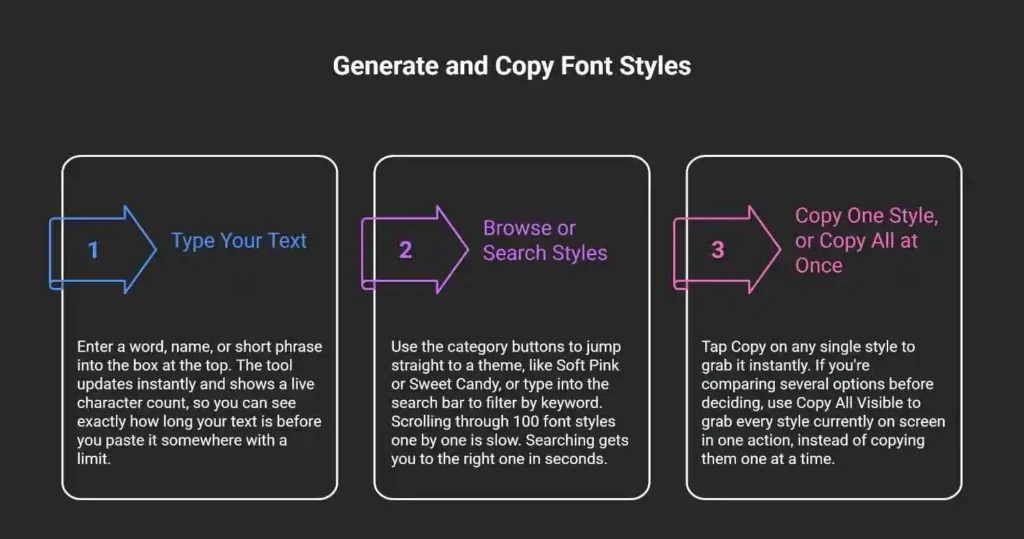
Getting a styled version of your text takes three steps and about ten seconds.
Explore Every Font Category
This cute font generator organizes 100 styles into 10 categories, so you’re choosing a mood, not scrolling a random list.
Best Cute Fonts
A curated mix of the most popular styles, all-purpose and cute. This is the right starting point if you haven’t decided on a specific look yet. It pulls a little from every other category, so it works as a fast preview of what this cute font generator offers.
Kawaii Hearts
Heart-framed text for anything romantic, sweet, or affectionate: Valentine’s posts, anniversary captions, or a soft sign-off in a message. Hearts are one of the most recognizable cute emojis, and pairing them with text is one of the simplest ways to soften a caption without overdoing it.
Bunny & Pets
Text paired with animal symbols like bunnies, kittens, and pandas. A natural fit for pet accounts, animal-lover bios, or anything meant to feel gentle and warm. This category pairs especially well with short usernames, where one small animal symbol adds a personal touch without cluttering the name.
Sweet Candy
Dessert-themed styling using symbols like lollipops, donuts, and gummy bears. Popular for food content, bakery pages, and anything with a playful, sugary tone. If your brand or profile already leans colorful and fun, this category tends to match the tone better than the softer, pastel-leaning ones.
Soft Pink
Pastel-leaning styles built around ribbons, blush tones, and gentle framing. Works well for a cohesive pastel aesthetic across an entire profile, and it’s a strong match if you’re building a soft girl or cottagecore-style feed where consistency matters more than variety.
Tiny Cute
Minimal, small-scale decoration for people who want a hint of cute without covering the whole word in symbols. Good for usernames or short taglines, and often the safest pick if you’re not sure how a platform will render heavier decoration.
Cute Faces (Kaomoji)
What Are Kaomoji, and How Are They Different From the Other Cute Styles?
Kaomoji, sometimes called Japanese kaomoji since the style originated in Japan, are emoticons built entirely from regular keyboard characters, like (^ᵕ^) or (。•́︿•̀。). Unlike the other categories, which wrap your typed text in decorative symbols, kaomoji are complete expressions on their own. They don’t decorate a word. They express an emotion, like happy, sleepy, or shy, without using any letters at all. That makes them useful in a different way: as a reaction next to your text, not a replacement for it.
Flower Cute
Floral symbols like daisies, sunflowers, and flower crowns, framing your text for garden, spring, or cottagecore-leaning content. This is one of the more seasonal categories, and it tends to see the most use in spring and summer captions. It also pairs well with a Soft Pink style if you want florals and pastel tones working together instead of picking one or the other.
Bubble Cute
Rounded, bubble-style symbols built from soft curves and rounded letters that give text an inflated look. A strong match for playful usernames and casual, high-energy captions, and one of the closest categories here to the Y2K-inspired styling that’s come back into style recently.
Bubble Cute Numbers
These styles aren’t only for letters. Number styles let you decorate dates, prices, ages, and countdowns the same way you’d decorate a word, using rounded or bubble-style digits instead of plain ones. This is a smaller use case, but it shows up constantly in birthday posts, sale announcements, and countdown captions.
Premium Cute
A curated set of the more elaborate, jewel and crown-themed styles, for text that wants to feel a little more polished or special-occasion. These styles work best in short bursts, a single word in a bio or an announcement headline, since heavier decoration loses impact once it’s spread across a full sentence.
Mixing and Matching Font Styles
Nothing stops you from combining categories. A short font mixer approach, pairing a Soft Pink style with one Kawaii Hearts symbol, or a Tiny Cute base with a single kaomoji beside it, usually looks more intentional than picking one category and using it exactly as generated. This is one of the more overlooked features of a cute font generator: most people copy a single style, but combining two small pieces almost always looks more deliberate. The main rule that keeps mixed styles readable: change one part of the text, not all of it. Decorate the edges, keep the core word clean.
Will These Cute Fonts Work Everywhere You Post Them?
Mostly yes, but not identically everywhere, and platforms are stricter in places people don’t expect. Because this cute font generator sticks to standard Unicode characters instead of custom fonts, styled text tends to survive copy-paste better than people assume, but the character limit you’re allowed and whether your username specifically supports it still depends on the platform. The table below covers the platforms this audience uses most, based on each platform’s publicly stated limits as of mid-2026. Platforms update these numbers periodically, so treat this as a solid working reference rather than a permanent guarantee, and double-check the exact figure before anything important, like a business bio.
| Platform | Supported? | Typical Bio/Name Limit | Notes |
| Yes, in bio and captions | 150 characters (bio) | Your @username itself cannot use styled Unicode characters, only your display name and bio can | |
| TikTok | Yes, in bio | 80 characters (bio) | Same rule as Instagram: your @username is plain text only |
| Discord | Yes, in nickname and status | 32 characters (nickname) | Server-specific nicknames support styled text more reliably than your global username |
| Yes, in status and messages | 139 characters (status) | Very decorative styles can look cluttered in a small chat bubble; simpler styles read better | |
| Yes, in posts and About section | Varies by field | Older app versions occasionally show boxes for newer Unicode symbols | |
| X (Twitter) | Yes, in bio and display name | 160 characters (bio), 50 (display name) | Display Name accepts styled text; @handle does not |
| Snapchat | Yes, in display name | 32 characters (display name) | Your @username is restricted to plain characters, same pattern as Instagram and TikTok |
| Yes, in profile name and pin descriptions | 65 characters (display name) | Board and pin descriptions accept styled text with more room to work with |
Styled Text for Instagram Bios & Captions
Instagram renders most Unicode styles cleanly in both your bio and your captions. A styled Cute Bio is one of the most common reasons people come to a cute font generator in the first place. Keep in mind your bio has a 150-character ceiling, and heavily decorated styles use up that space fast since every symbol counts as a character.
Cute Fonts for TikTok
TikTok bios are short, just 80 characters, so a simpler cute style tends to read better than a long, symbol-heavy one. Save the more elaborate styles for captions, where you have more room.
Kawaii Style for Discord Names
Discord nicknames support styled text well, but your global Discord username, the one after the @, is restricted to plain lowercase letters, numbers, underscores, and periods. If you want a styled Display Name, set it as your server nickname instead.
Styling a WhatsApp Status
A short status update with one or two symbols usually reads better than a fully decorated sentence, simply because status text appears small on most phone screens.
Styled Text for Gaming Usernames
Support varies by game. Some titles allow full Unicode in display names, while others restrict usernames to standard letters and numbers for account and search reasons. Check your specific game’s naming rules before committing to a fully styled username, since a rejected name is a common frustration here.
Using These Styles in Word, Notion & Google Docs
Since these are Unicode symbols, they paste directly into Word, Google Docs, and Notion just like emoji do. This makes them a quick way to style a heading or highlight a keyword without touching the app’s built-in formatting tools.
Choosing Styles for Logos and Names
Coolest fonts for logos usually aren’t the heaviest, most decorated ones, and that holds whether you’re searching coolest for logos or cutest for logos. A logo has to stay legible at a small size, on a business card or an app icon, so a Tiny Cute or Best Cute style tends to work better than something from the Bubble Cute or Premium Cute categories. Save the more elaborate aesthetic combos, like Aesthetic Emoji Combos paired with a script style, for captions and bios where they have room to breathe. The same logic applies if you’re using a font generator for names: a name gets read quickly and often at a glance, so restraint reads as more polished than maximum decoration.
Why Do Styled Symbols Sometimes Show Up as Boxes or Look Different?
Why Symbols Render Differently on iPhone vs. Android
Every operating system ships with its own font files that decide how each Unicode character is drawn. Apple, Google, and Samsung each interpret newer or less common Unicode blocks slightly differently. When a device doesn’t have a matching glyph for a character, it shows a small box or a placeholder symbol instead. This isn’t a bug in the generator. It’s a gap in what that specific device’s font files support.
How to Choose “Safe” Styles That Work on Any Device
The simplest styles, built from widely supported Unicode blocks like basic bold, italic, and common heart or star symbols, are the least likely to break anywhere. The more elaborate combinations, especially ones layering multiple symbol types together, carry slightly more risk on older devices. If you’re styling something important, test it on a second device before you commit to it everywhere.
Are Cute Fonts Accessible? A Note on Screen Readers
Screen readers, the tools that read text aloud for people with visual impairments, work by matching characters to known letters and words. Standard Unicode letters read normally, but many decorative characters, like bold, script, or bubble styles, aren’t recognized as their intended letter. A screen reader may skip them, read them as unrelated symbols, or spell them out one character at a time.
The practical fix is simple: use styled text for short, decorative touches, like a single word in a bio or one symbol as a divider, and keep longer, meaningful text in plain characters. That way you get the visual personality without making your content harder for someone using assistive technology to understand.
Choosing the Right Cute Aesthetic
Different cute aesthetics call for different styles. Matching your style to your aesthetic makes your whole profile feel more intentional instead of random.
| Aesthetic | Recommended Category | Example Style |
| Kawaii / Anime | Cute Faces, Kawaii Hearts | (^▽^) Hello ♡ |
| Pastel / Soft Girl | Soft Pink, Bubble Cute | ⋆。°✩ Hello ✩°。⋆ |
| Cottagecore | Flower Cute | 🌼 Hello 🌼 |
| Coquette / Clean Girl | Tiny Cute, Best Cute Fonts | ˚₊‧ Hello ‧₊˚ |
| Y2K / Bubble | Bubble Cute | ⊹⋆ Hello ⋆⊹ |
Kawaii & Anime-Inspired Styling
Pair a Kawaii Hearts style with a Cute Faces kaomoji for a combination that feels straight out of an anime fan community, like a styled username followed by a small kaomoji as a signature. This pairing is what most people mean when they picture a kawaii aesthetic: soft, Asian style pop culture influence paired with genuine warmth rather than heavy decoration.
Pastel, Soft Girl & Cottagecore Styling
Soft Pink and Flower Cute styles both lean into gentle, muted framing, which suits a pastel color palette and soft, cozy content.
Coquette, Balletcore & Clean Girl Styling
These newer aesthetic trends favor understatement over decoration. A Tiny Cute style, with just a light symbol or two, fits this look far better than a heavily decorated one.
Y2K, Bubble & Preppy Styling
Bubble Cute styles bring the rounded, inflated look associated with early-2000s digital design, making them a natural match for Y2K-inspired content.
Styled Text in Action: Before and After
Seeing the difference helps more than describing it.
- Plain bio:
photographer based in LA - Styled bio:
♡photographer based in LA♡ - Plain Discord name:
luna - Styled Discord name:
⋆.˚ luna ˚.⋆ - Plain caption:
new post is up - Styled caption:
🌸new post is up🌸 - Plain shop name:
sweet treats bakery - Styled shop name:
🍰sweet treats bakery🍰
Small, consistent decoration, applied to short pieces of text rather than entire paragraphs, tends to look the most intentional and the most readable at the same time.
Frequently Asked Questions
Will my styled text work on every platform I post it to?
Most platforms support Unicode styling in bios, captions, and display names, but not always in your actual username or handle. Check the compatibility table above for specifics on Instagram, TikTok, Discord, and other major platforms.
Why do some styled symbols show up as boxes?
The device you’re viewing them on doesn’t have a matching glyph for that specific Unicode character. It’s a gap in that device’s font support, not an error with the text itself.
Can I copy multiple styles at once instead of one at a time?
Yes. Use the Copy All Visible button to grab every style currently shown on screen in a single action, instead of tapping Copy on each one individually.
What’s the difference between cute fonts and kawaii fonts?
Kawaii specifically refers to Japanese-influenced cute styling, also called kawaii text, often including kaomoji faces. It’s a broader term covering any playful, decorated text, including kawaii styles alongside others like Soft Pink or Sweet Candy.
What are kaomoji, and how are they different from the other cute styles?
Kaomoji are complete emoticon expressions built from keyboard characters, like (^ᵕ^). Unlike other cute styles, they don’t decorate your typed text. They stand alone as a small expression of emotion.
Is there a character limit I should know about?
Yes, and it varies by platform. Instagram bios allow 150 characters, TikTok bios allow 80, and Discord nicknames allow 32. Decorative symbols count toward these limits the same as regular letters.
Why do the same cute font symbols look different across apps?
Each operating system uses its own font files to draw Unicode characters. Apple, Google, and Samsung don’t always support the newer or less common symbol sets the same way, so the same character can render slightly differently, or not at all, depending on the device.
Is there a “safe” set of styles that’s guaranteed to work everywhere?
No style is guaranteed on every device, but simpler styles built from widely supported Unicode blocks, like basic bold, italic, and common symbols, are consistently more reliable than heavily layered, decorative combinations.
Are these styles accessible for people using screen readers?
Not always. Many decorative Unicode characters aren’t recognized correctly by screen readers. Using styled text for short accents rather than full sentences keeps your content both stylish and accessible.
Is this free, and do I need an account?
Yes, this cute font generator is completely free with no account or sign-up required. Type your text and start copying styles immediately.
Can I use this styling for business or professional use?
Yes, in the right context. A cute style can work well for a lifestyle brand, bakery, or kids’ product bio, but it’s worth testing on a second device first if the text is going somewhere important, like a storefront name or a formal announcement.
How to get cute fonts without downloading a keyboard app?
You don’t need to. Keyboard apps that promise cute fonts usually just generate the same Unicode characters this page does, then ask for extra permissions on your phone. Typing your text here and copying the result does the same thing without installing anything.
Is there a cute cursive font generator option, or only bold styles?
Yes. The Pretty Fonts and Cute Calligraphy styles use script-style Unicode letters that imitate cursive handwriting, which sit alongside the bolder, symbol-heavy cute styles rather than replacing them.
Explore More Text & Font Tools
These text tools cover the styles and platforms this generator doesn’t focus on directly:
- Instagram Font Generator
- Discord Name Generator
- TikTok Font Generator
- Cool Fonts Generator, for cool fonts generator copy and paste styles outside the cute aesthetic
- Font Generator for Names
- Number Font Generator
About This Generator
This cute font generator converts your text into 100 styled options across 10 categories, using standard Unicode characters and kaomoji, all built to work without downloads, accounts, or fees. It’s checked periodically against current platform character limits and rendering behavior, and this page was last reviewed for accuracy in July 2026. If you notice a style that isn’t displaying correctly somewhere, that’s worth telling us, since device and platform support for Unicode changes over time and helps keep this page accurate for the next visitor.
Scroll back up, type your text, and see all 100 styles for yourself. That’s really the fastest way to find the one that fits.