
Social Media Bio Generator — 100 Ready-Made Bios for Instagram, TikTok, X & Facebook
Introduction
This social media bio generator gives you 100 ready-made bios sorted into 10 styles, so you can browse, compare, and copy instead of writing one from scratch. Pick your platform, filter by style, preview the bio on a live profile mockup, then copy it straight into your profile for your social media profile. It’s a free tool — no sign-up, no limit on how many bios you copy. One note on scope: this is a text tool. It writes and formats bio copy, not profile pictures or video intros, so if you’re after a picture or video generator, this isn’t it.
This is an independent bio-writing resource. It isn’t affiliated with Instagram, TikTok, X, Facebook, or Meta — those names are used only to describe the platforms and their character limits.
How This Tool Works
Most tools that call themselves a social media bio generator ask you to fill in a form and wait for one AI-written result. Some people call this kind of resource a bio maker instead of a generator — either way, the job is the same: help you land on bio text that actually fits your profile. This one works differently. It’s a library, not a lottery. You browse real, pre-written bios sorted into styles, star a few, compare them side by side, and copy whichever one sounds like you.
Choose Your Platform First
Tap Instagram, TikTok, X, or Facebook before you do anything else. Every one of these social media platforms enforces its own bio character limit, and the counter updates automatically the moment you switch between them, so you never have to count characters by hand.
Browse or Search 10 Bio Styles
Every bio sits inside one of 10 categories — Aesthetic Vibes, Professional & Career, Creator & Influencer, Funny & Attitude, Bold & Confident, Minimal & Clean, Lifestyle & Wellness, Business & Brand, Gaming & Tech, and Cute & Friendly. Jump straight to a category, or type a word into the search bar to filter by style if you already have a rough idea of the vibe you want.
Compare, Favorite, and Preview Before You Choose
Star a few bios you like, then use Compare to look at them side by side. None of the 100 bios are placed randomly — each one lives inside a specific category, so comparing two options from the same style, say two Bold & Confident bios, is a fairer test than comparing across styles. Hit Use on your favorite and it loads into a live profile preview, a mockup of an actual Instagram profile, so you can see how it looks with a username, follower count, and photo grid around it, not just as text on a blank page.
Copy One Bio, or Copy Them All
Every bio is copy and paste ready. Tap Copy on a single bio, or use Copy All Visible to grab every bio currently on screen — built for anyone juggling multiple social media accounts, like a social media manager testing bio options across several client profiles.
Bio Character Limits by Platform
Every platform gives you a different amount of space, and going over the limit means the text won’t save at all. Here’s what each one allows.
| Platform | Bio Limit | Hashtags Supported? | Clickable Link? | Line Breaks? |
| 150 characters | Yes, but not searchable through hashtag search | 1 link | Yes, though trailing spaces can get stripped | |
| TikTok | Up to 160 characters | Limited | 1 link | Limited |
| X (Twitter) | 160 characters | Yes | Yes | Yes |
| Facebook (personal profile) | 101 characters | No | Yes | Yes |
| Facebook (Page description) | Up to 255 characters | No | Yes | Yes |
| LinkedIn (headline) | 220 characters | No | Yes | Yes |
These numbers reflect each platform’s settings as of 2026. Platforms adjust character limits periodically, sometimes without much announcement, so if a number here looks off, check the app’s current settings before you publish. LinkedIn is a partial exception worth flagging: the 220-character figure above is for the headline field, which is what shows first. Its separate About section allows up to 2,600 characters — closer to a short career summary than a one-line bio.
Does the Character Limit Include Emojis and Spaces?
Yes. Every character counts toward the limit — letters, numbers, spaces, punctuation, and emojis. A single emoji can use up to two or more characters depending on the platform, so if you’re right at the edge of your limit, an emoji might push you over even though it looks like one character on screen.
What Happens If My Bio Is Too Long?
The platform simply won’t let you save it. You’ll usually see an error telling you to shorten the text. Nothing gets cut off automatically — you have to trim it yourself, which is exactly what the live character counter in this tool is built to prevent.
10 Bio Styles, Explained
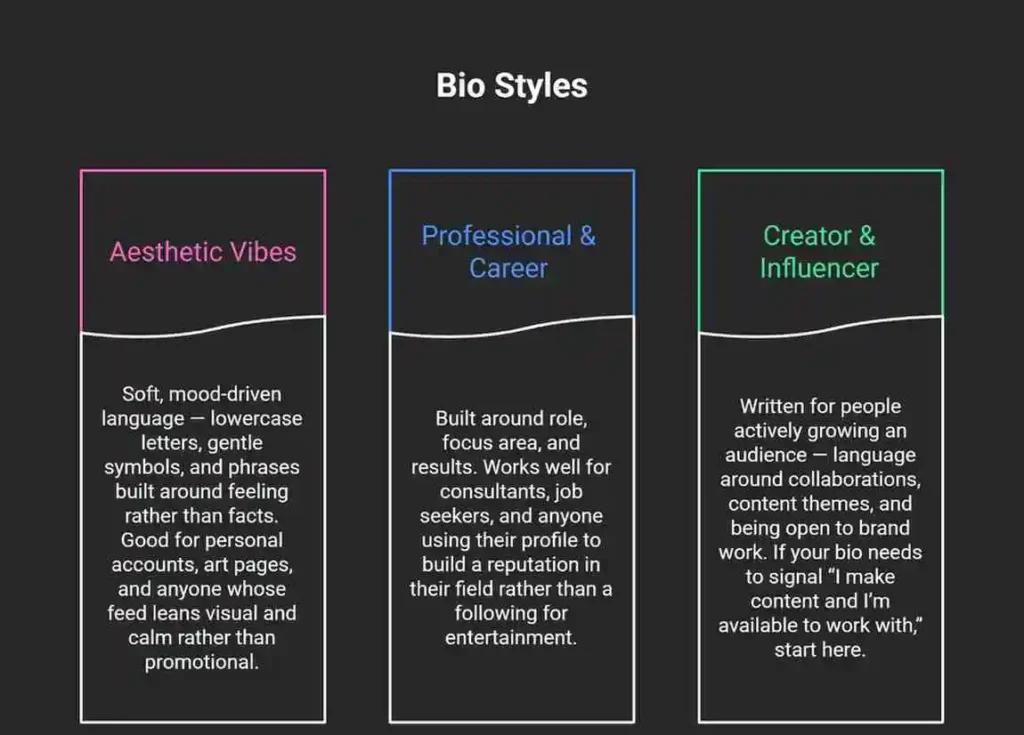
Scrolling through everything a social media bio generator offers, one bio at a time, isn’t the fastest way to find yours. Here’s what each category is actually built for, and a few ideas for who tends to reach for it, so you can jump straight to the style that fits.
Funny & Attitude
Self-aware, meme-literate humor. The category most likely to use internet slang and pop-culture references, which makes it a strong fit for personal accounts aimed at a younger audience.
Bold & Confident
Short, declarative statements with no hedging. Works for anyone who wants their bio to read like a statement rather than an introduction — common among fitness accounts, entrepreneurs, and personal brand pages.
Minimal & Clean
The opposite approach: as few words as possible, often just a single line. Good for anyone who thinks a busy bio looks cluttered, or who wants their photos to do the talking instead of the text.
Lifestyle & Wellness
Centered on daily habits, routines, and personal values — mornings, movement, food, travel. A natural fit for wellness coaches, slow-living accounts, and anyone whose content is about how they live rather than what they sell.
Business & Brand
Written for a company or shop rather than a person. This is the category most business owners reach for first when they try a social media bio generator, since it leads with what you sell rather than personality.
Gaming & Tech
Built around platforms, games, and identity within a gaming or tech community — Twitch, Discord, Steam, or VRChat, where your audience already speaks in usernames and platform-specific terms. If your content leans toward streaming, gameplay clips, or other video content, this category gives you a base that already matches that audience’s expectations.
Cute & Friendly
Warm, approachable, often emoji-heavy language. Tends to work well for younger audiences and accounts built around a soft, welcoming tone rather than authority or humor.
Quick way to decide: If you’re building a personal brand around expertise, start with Professional & Career or Business & Brand. If you’re growing an audience through content, start with Creator & Influencer. If you just want your profile to feel like you without overthinking it, Minimal & Clean or Aesthetic Vibes usually gets there fastest.
Instagram Bio Generator
Instagram is the single platform most people have in mind when they search for a social media bio generator, which is why its bio field gets the most attention here. It sits directly under your profile picture, capped at 150 characters — roughly 20 to 30 words depending on how long they are, so every word has to earn its place.
How to Add Line Breaks to Your Instagram Bio
Instagram sometimes strips out line breaks when you paste text directly into the bio field, especially if there’s a trailing space before the break. A reliable workaround: write your bio in your phone’s Notes app first, then copy and paste it into Instagram. This tends to preserve the spacing better than typing directly into the app.
Using Blank Space in Your Bio
Some people use an invisible Unicode character to create a blank line or extra spacing in their bio — this is often what people mean when they search for a bio space generator. It can work, but it’s inconsistent: Instagram strips some invisible characters during paste, and support varies by device, so treat it as a style trick rather than something to build your whole bio structure around. If separating parts of your bio matters more than the trick itself, symbols like a middle dot ( · ) or a vertical bar ( | ) are a more reliable way to do it.
How to Add Pronouns to Your Instagram Bio
Pronouns have their own dedicated field, separate from your main bio text, so they don’t eat into your 150-character limit. To add them: open your profile, tap Edit Profile, tap Pronouns, and choose up to four. You can set them to show to everyone or only to your followers. This feature is currently only available on mobile, not desktop.
Instagram Bio Fonts and Stylized Text
Stylish, stylized fonts — bold letters, cursive script, small caps — are made from Unicode characters, not actual font files, which is why you can copy and paste them anywhere. They can make a bio stand out visually, but they come with a real trade-off worth knowing about.
A Note on Accessibility
Screen readers are the software blind and low-vision users rely on to navigate apps. They often can’t interpret stylized Unicode text correctly — instead of reading your bio normally, a screen reader may spell out individual character names or skip the text entirely. If accessibility matters for your account, and for most public-facing profiles it should, keep stylized text limited to your name or a single short phrase, and write the rest of your bio in standard text.
Instagram Bio for Business vs. Personal Accounts
A business account bio usually leads with what you sell or offer, includes a clear way to contact you, and ends with a call to action pointing to your link. A personal account has more room to lead with personality, since the goal is connection rather than conversion. Instagram also lets you set a category label under your name — Digital Creator is a common choice for people who post content professionally but aren’t running a registered business, sitting between a fully personal profile and a business page.
Instagram Bio Ideas for Gen Z
Younger audiences tend to favor the Funny & Attitude and Cute & Friendly categories — short, self-aware, and often built around a single joke or aesthetic rather than a full description. Searches like “bio ideas for 13-year-olds” show that younger users usually want something fun and low-pressure, not a polished personal brand statement. If that’s you or someone you’re helping, the general safety advice stays the same regardless of style: skip identifying details like your school, home location, or exact age in a bio that anyone can see.
TikTok Bio Generator
TikTok gives you up to 160 characters for your bio, though this number has changed before — TikTok expanded it from a tighter 80-character limit, so don’t be surprised if you see both figures mentioned elsewhere.
TikTok Bio Character Limit
Up to 160 characters, including spaces and emojis, the same rule as every other field on this page: everything you type counts.
Why Your TikTok Display Name Matters for Search
Your display name is separate from your @username, and it shows up next to your videos in search results. TikTok’s algorithm treats it as a real search signal. A creator whose display name is just “Sarah” is harder to find than one whose display name is “Sarah | Candle Maker,” because the second version gives TikTok’s search a keyword to match against. If you post consistently about one topic, adding that topic to your display name, not just your bio, is one of the simplest ways to become more discoverable without changing anything else about your content.
TikTok Bio Ideas by Niche
TikTok is the second-most searched platform for a social media bio generator, right behind Instagram, and the niche you post in should steer which style you pick. TikTok’s bio sits above a grid of videos, so most visitors already have a sense of your content before they read a single word — the bio’s job is to add context, not repeat what’s obvious from your feed. Gaming and tech creators tend to do well with the Bold & Confident or Gaming & Tech categories, since short, declarative lines match how gaming usernames and profiles usually read. Lifestyle and wellness creators often do better with Lifestyle & Wellness or Aesthetic Vibes, since the tone matches slower, calmer video content. If your TikTok is built around comedy or a running bit, Funny & Attitude is the natural starting point — TikTok’s audience responds well to a bio that’s clearly in on the joke rather than one that reads like a résumé.
X (Twitter) Bio Generator
X Bio Character Limit
X allows 160 characters in the bio field, slightly more room than Instagram, which gives a social media bio generator a bit more space to work with here than on most other platforms.
Are Hashtags Searchable in an X Bio?
Yes. Unlike Instagram, hashtags placed in an X (Twitter) bio are indexed and searchable, which makes them genuinely useful for discoverability here rather than just decorative.
X Bio Ideas for Professionals vs. Personal Accounts
Professional X bios tend to lead with role and organization, since the platform is heavily used for industry conversation. Personal bios have more room to lean into humor or opinion, which is part of why the Funny & Attitude and Bold & Confident categories perform especially well here.
Facebook Bio Generator
Facebook Bio Character Limit
Facebook’s limits are tighter and split across more fields than most platforms, which is exactly where a social media bio generator saves the most guesswork. Facebook splits this into two fields. A personal profile’s About section allows 101 characters, enough for one clear sentence. Facebook Pages get more room: the short description field allows up to 255 characters, and it’s what shows up in Facebook search results and when someone hovers over your Page name in the feed, so it’s worth treating like a mini meta description rather than an afterthought.
Facebook Bio Ideas and Examples by Use Case
A small business Page bio works best when it states what the business sells and where, in plain language, without relying on a hashtag or emoji to do the explaining. Something like “Family-owned bakery in Denver. Custom cakes, walk-ins welcome.” covers who, what, and where in well under the limit. A personal Facebook bio has more flexibility, since most connections already know the person, so the bio is more of a light touch than an introduction. One scope note: Facebook doesn’t support hashtags in bios the way Instagram and X do, and it doesn’t include a bio video or profile picture generator — those are separate features you’d set up elsewhere on the Page.
How to Write a Social Media Bio (Even Without a Generator)
Even with a social media bio generator doing most of the work, it helps to understand why certain bios perform better than others — the same principles apply whether you’re picking from the 100 above or writing one completely from scratch.
The Three Things Every Good Bio Answers
Across every platform, a bio that works usually answers three questions in some order: who you are, what you do or offer, and why someone should care. You don’t need all three spelled out explicitly — sometimes tone alone answers “why should someone care” — but if a reader finishes your bio still confused about what your account is about, the bio isn’t doing its job.
Use Simple Words, Not Clever Ones
It’s tempting to reach for a clever phrase, but plain, specific words usually beat clever ones. “Runs a small ceramics studio in Portland” tells a stranger more in six words than “creating magic with clay” does in five, even though the second one sounds more polished. If you’re stuck, write the plain version first — what you actually do, in normal words — then decide if it needs personality added on top. It’s easier to add style to a clear sentence than to find clarity inside a clever one.
Should You Use Emojis?
A single well-placed emoji can add personality without cluttering the text. A full row of them usually does the opposite, making a bio harder to read at a glance rather than easier.
How Often Should You Update Your Bio?
There’s no fixed rule, but updating your bio whenever something meaningful changes — a new offer, a niche shift, a new location — keeps it accurate. Many creators also do a quick review every month or so as part of a broader profile check, even if nothing obvious has changed.
Bio vs. Link in Bio — What’s the Difference?
These get confused often, but they’re two different things. A bio generator, like this one, writes the text that sits under your name. A link-in-bio tool builds a separate mini landing page with multiple clickable links, which you then connect to the single link slot most platforms give you. You can use both together: a strong bio explains who you are, and a link-in-bio page handles the “where do I click” part.
Does Your Bio Affect Discoverability?
On some platforms, yes. Instagram and TikTok both use text on your profile, including your bio and, on TikTok, your display name, as part of how they match your account to search results. A bio with your niche mentioned in plain language gives the platform something concrete to match against when someone searches for your social media profile.
Real Bio Examples by Goal
Generic advice is easy to give and hard to apply. Here’s what the difference between a weak bio and a stronger one actually looks like, side by side.
| Goal | Weaker Bio | Stronger Bio | Why It Works Better |
| Fitness coach | “I love fitness and helping people” | “Certified PT 💪 Helping busy professionals build strength in 20 min/day ↓ Free plan” | Specific credential, specific audience, and a clear next step |
| Small business | “Welcome to my shop!” | “Handmade candles, small-batch 🕯️ Free shipping over $40 ↓” | States the actual product and a concrete reason to click through |
| Student or job seeker | “Just a student” | “Marketing student, NYU · Former intern, [Brand] · Open to summer roles” | Names real credentials that are also searchable keywords |
| Streamer or gamer | “I play games sometimes” | “Variety streamer, Tues/Thurs 7pm ET · Currently running a Zelda blind playthrough” | Gives a specific reason to tune in and a checkable detail |
The pattern in every “stronger” version is the same: specific details instead of general statements, and a clear next action instead of no action at all.
Frequently Asked Questions
Is this bio generator free? Do I need to sign up?
Yes, it’s free to use, and there’s no account or sign-up required. Browse, preview, and copy as many bios as you want.
How is this different from asking an AI chatbot, or using another AI bio generator like Ahrefs’?
An AI chatbot writes one custom response based on a prompt, which can take a few tries to get right. Most dedicated tools, including Ahrefs’ bio generator, work in a similar way: enter some details and get a handful of AI-written options back. This social media bio generator skips both of those steps. It’s a library of 100 pre-written bios across 10 distinct styles that you browse, compare, and preview instantly, without writing a prompt or regenerating until something lands.
Is my data stored or used to train anything?
No account is required to use the tool, and no personal information is needed to browse or copy a bio.
Is the bio I copy unique to me?
The bios are pre-written and shared across everyone who uses the tool, the same way a list of quotes or examples would be. If you want something more personal, use one as a starting point and swap in your own details, niche, or name.
Platforms and Character Limits
What’s the Instagram bio character limit?
150 characters, including spaces, punctuation, and emojis.
What’s the TikTok bio character limit?
Up to 160 characters, though this has changed before and may change again, so it’s worth double-checking inside the app if you’re right at the edge.
What’s the Facebook bio character limit?
101 characters for a personal profile’s About section, and up to 255 characters for a Facebook Page’s short description.
Can I use the same bio on every platform?
You can, but it’s usually not the best move. Character limits differ, hashtag support differs, and audience expectations differ — a bio written for LinkedIn tends to read as too formal on TikTok, and vice versa.
Features
Can I compare two bios before choosing one?
Yes. Star the ones you’re considering, then use the Compare feature to view them side by side.
Can I see what my bio will actually look like on a profile before I use it?
Yes. The live preview shows your selected bio inside a mockup of a real profile layout, with a username, photo grid, and stats around it, so it’s easier to judge than plain text on its own.
Can I copy several bios at once?
Yes, using Copy All Visible, which grabs every bio currently shown on screen — useful if you’re comparing options across several accounts.
Writing and Style
Should I use emojis or hashtags in my bio?
Used sparingly, both can help. Overused, both make a bio harder to read. Note that hashtags in an Instagram bio aren’t searchable through hashtag search, while hashtags in an X bio are.
Should I use simple words or a clever phrase?
Plain, specific words usually work better than a clever phrase a stranger has to decode. Say what you actually do first, then add personality if there’s room left.
Are stylized fonts safe to use for accessibility?
Not entirely. Screen readers often can’t read stylized Unicode text correctly. If you use a stylized font, limit it to your name or a short phrase, and keep the rest of your bio in standard text.
How do I add pronouns to my Instagram bio?
Go to Edit Profile, tap Pronouns, and choose up to four. This feature is mobile-only and doesn’t count against your 150-character limit.
Business and Professional Use
Can businesses use this, not just individuals?
Yes. The Business & Brand and Professional & Career categories are built specifically for company pages, shops, and professional profiles.
Can I use this for a LinkedIn headline or About section?
Yes, though keep in mind LinkedIn’s character limits and tone expectations are different from Instagram or TikTok, so a bio that sounds right on one platform may need editing before it works on the other.
Troubleshooting
Why was my bio rejected when I tried to save it?
Almost always because it’s over the character limit for that field. Check the live counter and trim until you’re under the limit.
What if my bio still doesn’t fit after editing?
Cut the least essential part first, usually a secondary detail rather than your name, niche, or main call to action. A shorter, clearer bio generally works better than a longer one crammed with everything you wanted to say.
Between the character-limit table, the 10 styles, and the platform-specific notes above, most of what shapes a good bio is covered here: the exact space you’re working with, the categories worth trying first, and the small platform quirks — stripped line breaks, non-searchable hashtags, screen reader limits — that don’t show up until you run into them. The fastest next step with any social media bio generator is usually the simplest one: pick a platform in the tool above, browse a style that matches your accounts, and copy what fits.
## Related Tools
- Fancy Text Generator — for a much larger catalog of 358 styles beyond bio-specific formatting.
- Bold Font Generator — for punchy, high-contrast styles suited to gaming and tech bios.
- Aesthetic Font Generator — for soft, moodboard-style fonts suited to lifestyle profiles.
- Cute Font Generator — for kawaii, playful styles with hearts and kaomoji.
- Instagram Font Generator — for styles organized specifically by Instagram use case.
- TikTok Bio Generator — for a dedicated tool focused only on TikTok’s 80-character bio format.
Social Media Bio Preview
Click Use on any generated bio to preview it here.
@yourusername
Digital Creator
Choose a bio and click Use.
Instagram Bio
Your selected bio will appear inside the preview card with the correct platform limit.
Independent profile preview. Not affiliated with Instagram, TikTok, X, Facebook, or Meta.