
Instagram Font Generator
Categories
Use the buttons below to explore Instagram font categories.
Generated Instagram Fonts
Showing Instagram fonts
Introduction
Type your text, pick a style, and copy it straight into your bio, caption, username, or story. No sign-up. No download. Nothing you type is stored.
This free online font generator for Instagram is organized differently than most font generators and font makers you’ll find. Instead of sorting styles by typography alone, it’s grouped by what you’re actually posting — bio, business profile, Reels, aesthetic feed, and more — so you spend less time scrolling and more time posting. Some people search for this kind of tool as an IG font generator, an Insta fonts maker, or simply stylish text for Instagram — they’re all pointing at the same idea: turning regular letters into custom text you can copy and paste anywhere.
What Is an Instagram Font Generator?
An Instagram font generator is a free tool that turns plain text into stylish text using Unicode characters and symbols. Type a word, and the fonts generator swaps each letter for a Unicode symbol that looks like a different typeface — bold, cursive, small caps, and dozens of other styles.
These aren’t real fonts in the traditional sense. A real font is a set of design instructions a device applies to standard letters. Unicode characters are different: each styled letter is its own unique character, built into the same universal text standard used by every phone, browser, and app in the world. That’s exactly why you can copy one and paste it anywhere — the character travels with the text itself, not with a font file.
Unicode is maintained by the Unicode Consortium, a nonprofit that manages symbol standards so text displays consistently across devices and languages. It includes tens of thousands of characters: not just the alphabet, but math symbols, historical scripts, and the character sets that font generators repurpose to imitate bold, italic, and script styles.
Are Fancy Fonts the Same as Real Typefaces?
No. A cursive Unicode character will always look cursive, on any app, because it’s a distinct symbol. A real cursive font only looks cursive if the app or website has that font installed and chooses to render it that way. Instagram doesn’t let you install custom fonts, which is exactly why Unicode substitution is the only way to get styled text into a bio or caption.
How to Use the Instagram Font Generator
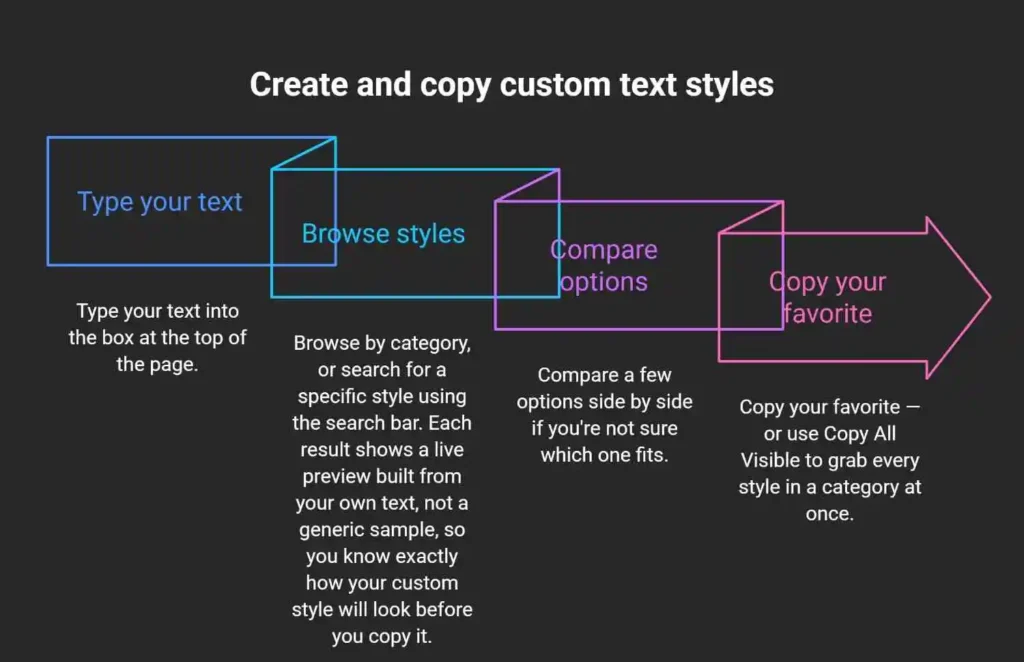
Once you’ve copied a style, open Instagram, tap the field you want to update (bio, caption, username, comment, or Story text), and paste. That’s the entire process. No app switching, no extra steps.
If you find a few styles you like but aren’t ready to use them yet, tap the star icon to save them as favorites so you can find them again without re-searching.
Browse Instagram Font Styles by Category
Most Instagram font generator tools sort styles by typography — bold, italic, cursive — and leave you to figure out which one actually fits your post. This one sorts by use case first, so the category itself tells you when to reach for it. Whether you’re after cool, attention-grabbing text or something quieter, browsing by category gets you there faster than scrolling through every style built for Insta one by one.
Instagram Bio Fonts
Your bio is 150 characters, and it’s often the first thing a visitor reads before deciding to follow you. This category includes styles built for that context — clean layouts for a straightforward bio, and a few with built-in structure, like “Creator Bio Pro” or “Signature Link Bio,” for creators who want their name, tagline, and link to feel intentional rather than thrown together.
Username & Profile Fonts
Worth noting up front: Instagram usernames only accept plain text — no Unicode styling is allowed there. This category is for your display name instead, which does support styled text. Styles like “Verified Handle” and “Profile Spotlight” are built for that name field specifically.
Aesthetic Instagram Fonts
Wide letter spacing, small caps, and soft decorative characters — the look associated with moodboard-style, lifestyle, and Y2K-inspired accounts. “Lavender Haze” and “Velvet Wave” are examples built for this mood.
Cute Instagram Fonts
Rounded, playful styles with light decorative touches, often paired with hearts or paw-print style symbols. Popular with fan accounts, pastel aesthetics, and kid-friendly pages.
Bold & Viral Fonts
Short, punchy, cool styles meant to grab attention fast — useful for a Reels hook, a headline caption, or a comment you want noticed in a crowded thread. “Viral Hook” and “FYP Energy” fall into this group.
Elegant & Luxury Fonts
Serif-inspired and script styles suited to weddings, fashion, and higher-end branding. “Old Money Serif” and “Royal Monogram” are built for that tone.
Minimal Instagram Fonts
Understated styles for accounts that lean editorial or design-forward — a single clean line rather than a heavily decorated one. “Quiet Editorial” and “Bare Profile” fit here.
Influencer & Business Fonts
Styles built for professional context: media kits, brand pages, and creator profiles that need to read as polished rather than casual. “Media Kit Pro” and “Founder Mode” are examples.
Reels & Stories Fonts
Text built for the pacing of short-form video — hook-style openers, poll prompts, and swipe cues. “POV Hook” and “Watch Till End” are designed around how people actually caption Reels and Stories. These styles also work well as Highlight cover titles, since they’re built to be read at a glance.
Instagram Frames
Decorative borders and brackets that wrap around your text rather than replacing the letters themselves — a subtler way to draw the eye without changing the whole font.
Quick reference:
| Category | Best For | Example Style | Mood |
| Bio Fonts | Personal and creator bios | Creator Bio Pro | Clean, direct |
| Username & Profile | Display names | Verified Handle | Trustworthy |
| Aesthetic | Lifestyle, moodboard accounts | Lavender Haze | Dreamy |
| Cute | Fan pages, pastel niches | Bunny Bounce Bio | Playful |
| Bold & Viral | Hooks, trending posts | Viral Hook | Attention-grabbing |
| Elegant & Luxury | Weddings, fashion, luxury brands | Old Money Serif | Refined |
| Minimal | Editorial, design-led accounts | Quiet Editorial | Understated |
| Influencer & Business | Media kits, brand pages | Media Kit Pro | Professional |
| Reels & Stories | Short-form video captions | POV Hook | Trend-aware |
| Frames | Decorative text borders | Polaroid Caption Frame | Decorative |
Which Font Style Should You Use?
The right style depends on where the text is going and who’s reading it.
By content type:
- Bio — pick something readable at a glance. Save heavier decoration for a single line, not the whole thing.
- Caption — bold or italic works well for the first line, since that’s what shows before “more” gets tapped.
- Story text — short, high-contrast styles read best over a photo or video background.
- Comments — bold or small caps stand out in a thread without becoming hard to read.
By niche, a few starting points: fitness and coaching accounts tend to favor bold, direct styles; beauty and fashion lean toward script or elegant serif; gaming and meme accounts often use bubble or glitch-style text; small businesses and consultants usually read better in minimal or small-caps styles that stay professional.
Cursive vs. bold vs. aesthetic vs. minimal:
| Style | Tone | Best Use | Compatibility Risk |
| Cursive/Script | Personal, elegant | Bio taglines, wedding or beauty accounts | Low |
| Bold | Direct, attention-grabbing | Headlines, first line of a caption | Low |
| Aesthetic | Soft, moodboard-style | Lifestyle and Y2K-inspired feeds | Medium |
| Minimal | Understated, professional | Editorial or design-forward accounts | Low |
There’s no single “best” font. The most effective choice is the one that matches the account’s tone and stays easy to read.
Will Your Font Actually Work? (Device and Platform Compatibility)
This is the most common problem people run into with an Instagram font generator, so it’s worth explaining clearly instead of glossing over it.
Every phone and browser has a system font that defines which Unicode characters it can display. Widely used characters — the ones behind bold, italic, and standard cursive styles — are supported on nearly every device made in the past several years. More obscure Unicode ranges, the kind used for heavily decorated or combining-character styles, aren’t guaranteed to be included in every system font. When a device doesn’t recognize a character, it shows a box or a question mark instead of the letter.
That’s a device limitation, not a mistake in the text itself. The same styled text that looks perfect on your phone might show boxes on a friend’s older Android device, simply because that device’s font library doesn’t include the same Unicode range.
How to Predict Compatibility Before You Paste
As a rule of thumb: the simpler and more common the style, the safer it is. Bold, italic, small caps, and standard cursive use Unicode ranges that have been supported for years. Heavily decorated styles — anything built from combining characters, rare symbol sets, or stacked diacritics — carries more risk on older devices.
| Style Type | Device Support | Risk Level |
| Bold, Italic, Small Caps | Nearly universal | Low |
| Script/Cursive | Very broad | Low |
| Bubble, Circled | Most current devices | Medium |
| Heavily decorated or combining characters | Inconsistent on older devices | High |
If a style doesn’t display right for you, it’s not broken — just switch to a different one. The tool includes plenty of low-risk options in every category.
Separately, Instagram itself filters out a small number of characters, mostly ones associated with spam or excessive symbol stacking. That’s a platform-level filter, not a device issue, and it affects a small share of the most extreme decorative styles.
Where You Can Use Styled Fonts on Instagram
Anywhere Instagram accepts text input, an Instagram Font Generator can style it — with one notable exception covered below.
| Placement | Styling Supported | Character Limit | Notes |
| Bio | Yes | 150 | Full styling supported |
| Display Name | Yes | 30 | Styled text allowed |
| Username | No | 30 | Plain text only — Instagram’s rule, not a tool limitation |
| Caption | Yes | 2,200 | Full styling supported |
| Comment | Yes | — | Full styling supported |
| Instagram Stories text | Yes | — | Full styling supported |
| Instagram Reels title/description | Yes | — | Full styling supported |
| Highlight cover titles | Yes | — | Full styling supported |
The username restriction trips people up the most. Your username (the @handle) has to stay plain text — that’s an Instagram requirement, not something this tool can work around. Your display name, the larger text shown on your profile, does support styling.
Keeping Your Name Searchable
Instagram’s internal search matches plain text, not styled Unicode characters. If you fully style your Instagram name — your display name, not your username — people searching for you by typing it normally may not find your profile. A simple fix: keep your core name or brand keyword in plain text, and add custom styled flourishes around it rather than replacing every letter.
Does a Styled Font Affect Your Reach or Engagement?
This gets asked constantly, and most answers online lean on vague, unsourced claims. Here’s an honest breakdown.
What’s actually confirmed: styled Unicode text is just text — Instagram’s recommendation systems for Reels and posts are built around engagement signals like watch time, likes, and shares, not the character set your caption uses. There’s no confirmed mechanism by which using a bold or cursive font would trigger a reach penalty.
What’s not confirmed: claims that stylized text increases followers or profile visits by a specific percentage. You’ll see numbers like this on other sites, usually with no source behind them. A well-formatted, readable bio can make a stronger first impression than a plain one — that’s a reasonable, common-sense point. But a precise percentage lift isn’t something anyone can back up without real data, so it’s better treated as a plausible benefit than a guaranteed result.
Shadowban Myths vs. Character Filtering
These two things get mixed up constantly, and they’re not the same:
- Character filtering means Instagram blocks a small set of specific symbols from displaying, usually ones tied to spam patterns. This affects individual characters, not your account’s reach.
- Shadowbanning would mean your account’s content is being suppressed across the board. There’s no evidence that using standard Unicode-styled text triggers this. It’s a different issue entirely, usually linked to things like automation tools, mass-following behavior, or reported content — not font choice.
If a specific style isn’t displaying, that’s character filtering. It says nothing about your account’s overall reach.
Accessibility: Can Everyone Read Your Styled Text?
This gets left out of most guides, but it matters. Screen readers, used by people with visual impairments, read text aloud character by character. Standard letters are recognized instantly. Unicode styled characters often aren’t — a screen reader may skip them, read them as unfamiliar symbols, or spell them out one character at a time, which can turn a short bio into a confusing string of noise.
A practical approach: use styled text for decorative touches — a name, a short tagline, a single accent line — and keep anything functionally important, like contact information or a call to action, in plain text. That way the page stays visually distinct without excluding anyone trying to read it with assistive technology.
Is It Safe to Use an Instagram Font Generator?
Three questions come up about using an Instagram Font Generator, and they deserve direct answers.
Do you need to log in or download anything? No. The tool runs entirely in your browser. There’s no app to install and no Instagram login required.
Is your text stored or shared? No. Text you type is processed in your browser to generate the styled output and isn’t saved or sent anywhere.
Does this violate Instagram’s Terms of Service? No. You’re pasting standard Unicode characters — the same category of characters used in emojis and international text — into fields Instagram already allows you to edit. It’s the same as typing any other text.
Using Styled Fonts Beyond Instagram
Because the output is standard Unicode, it isn’t limited to Instagram. The same copied text works on TikTok bios, WhatsApp statuses, Discord messages, Threads posts, and Twitter/X. Anywhere that accepts regular text input will generally accept these characters too.
One caveat: each platform has its own filtering rules, similar to Instagram’s. A style that works everywhere on Instagram might get filtered slightly differently on Discord or WhatsApp. If something doesn’t display right on a specific platform, try a simpler, more widely supported style first.
Fonts in Languages Beyond English
Unicode font generators are built primarily around the Latin alphabet, so styling works most reliably for English and other Latin-script languages like Spanish, Portuguese, and Indonesian.
Non-Latin scripts — Arabic, Hindi, and similar languages — work differently. These scripts already have their own connected letterforms and writing rules, and most Unicode “fancy text” styles weren’t built to support them. If you write primarily in a non-Latin script, plain text will generally display far more reliably than a styled substitute.
What Font Does Instagram Itself Use?
Separate from font generators, people often ask what font does Instagram use for its own interface — the menus, buttons, and default text you see in the app itself. It varies by platform: iOS uses Apple’s system font, San Francisco. Android uses Roboto, Google’s sans-serif system font. On the web, Instagram primarily uses Proxima Nova. None of these are Instagram’s default font in a way you can apply to your own bio or captions — they’re built into each operating system and aren’t available for custom text on the platform. If you want styled text of your own, a fonts generator built for Instagram is still the way to get it, since it works with characters the platform already accepts rather than a font you’d need Instagram to install.
Frequently Asked Questions
Is the Instagram font generator free?
Yes. It’s free to use, with no sign-up, no download, and no limit on how many times you generate text.
Do these fonts work on iPhone and Android?
Most styles work on both. Regular fonts like bold, italic, and standard cursive have the broadest support. Heavily decorated styles are more likely to show as boxes on older devices.
What are the best or coolest Instagram fonts to use?
There’s no single best option — the coolest styles from an Instagram Font Generator for one account (bold, high-contrast styles for a gaming or meme page) can look wrong on another (a wedding photographer is usually better served by a script or elegant serif style). Match the style to your account’s tone rather than picking whatever looks flashiest.
Why do some fonts show up as boxes or question marks?
The device you’re viewing them on doesn’t have that specific Unicode character in its system font. Switching to a simpler style usually fixes it.
Can I use fancy fonts in my Instagram username?
No. Usernames only accept plain text — that’s a rule set by Instagram, not a tool limitation. Your display name, bio, captions, comments, and Story text all support styled fonts.
Will using fancy fonts hurt my reach or get me shadowbanned?
There’s no confirmed evidence that styled text affects your reach. It’s separate from shadowbanning, which is generally linked to behavior like automation or mass-following, not font choice.
Do fancy fonts work on other apps besides Instagram?
Yes. Because they’re standard Unicode characters, they also work on TikTok, WhatsApp, Discord, Threads, and Twitter/X, though each platform filters a slightly different set of characters.
What’s the character limit for an Instagram bio?
150 characters. Captions allow up to 2,200, and usernames and display names are capped at 30.
Is it safe to use a font generator? Does it store my data?
Yes, it’s safe. The tool doesn’t require a login, doesn’t ask for any personal information, and doesn’t store the text you type.
Can I save fonts I like to use again later?
Yes. Use the star icon next to any style to mark it as a favorite so you can find it quickly without searching again.
Can I use styled fonts in Arabic, Hindi, or other non-Latin scripts?
Not reliably. Most fancy text styles are built for Latin-alphabet languages. If you write in a non-Latin script, plain text will display more consistently.
Is this the same as a “meta tags font generator for Instagram”?
No — that phrase usually points people to a specific site with “meta tags” in its name. It has nothing to do with HTML meta tags, and it isn’t a required step for using this tool. You don’t need to set up any meta tags to generate or copy styled text here.
Type your text at the top of the page to get started, or jump to any category above to browse this Instagram Font Generator’s full library — built for exactly what you’re posting.
## Related Tools
- Fancy Text Generator — for a much larger catalog of 358 styles beyond Instagram-specific categories.
- Bold Font Generator — for punchy, high-contrast styles built for Reels hooks and captions.
- Aesthetic Font Generator — for soft, moodboard-style fonts suited to lifestyle accounts.
- Cute Font Generator — for kawaii, playful styles with hearts and kaomoji.
- TikTok Bio Generator — for ready-made bios that fit TikTok’s 80-character limit.
- Social Media Bio Generator — for pre-written bios across Instagram, TikTok, X, and Facebook.